How to Produce AI Short Drama and Anime Video with APIs in 2026
If you have tried to serialize an AI short drama or an anime adaptation, you already know where it falls apart. The lead character’s face drifts between episodes. A planned two-second cut comes back as one chaotic camera move. The dialogue beats never line up with the mouth. And the clip you actually wanted is six seconds long when you needed fifteen. None of this is optional polish — it is the difference between content you can publish and content you can only post once.
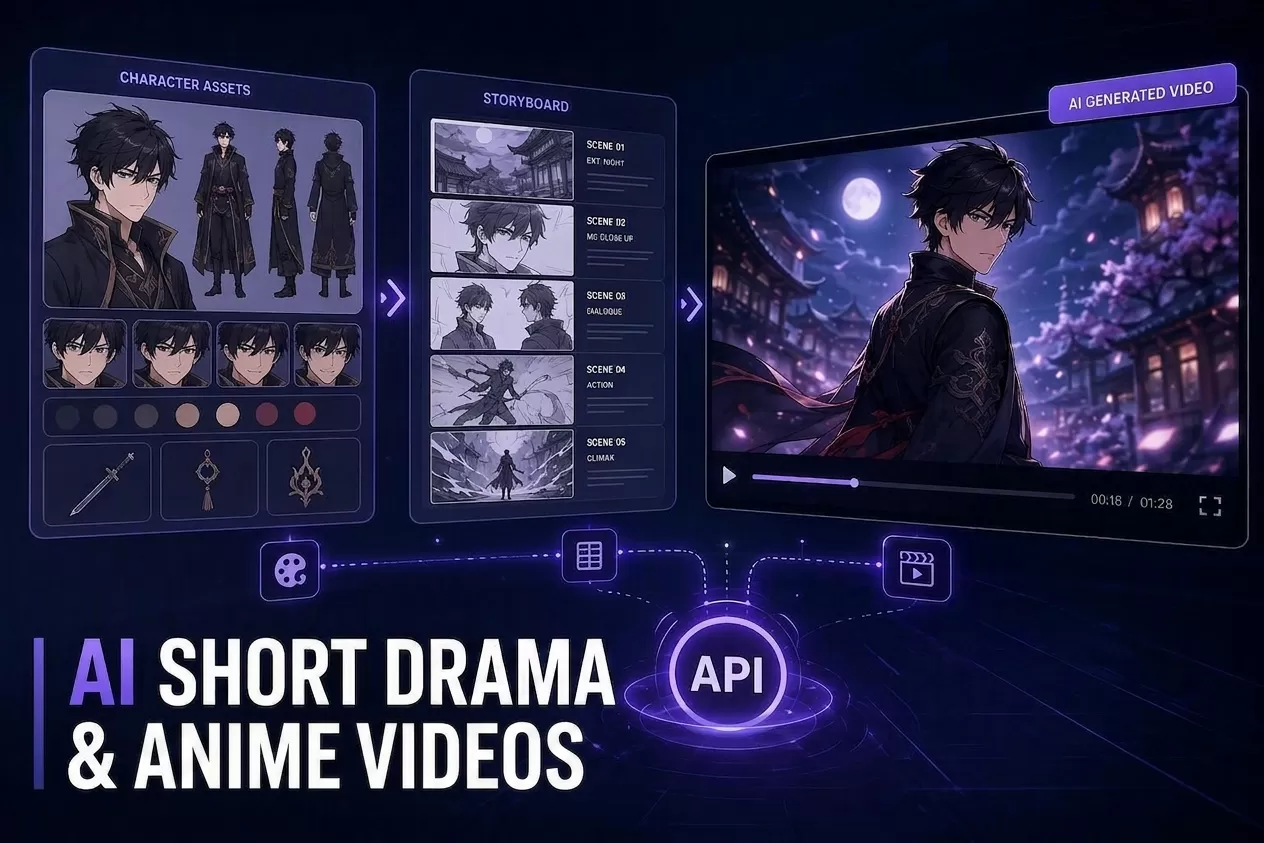
As of August 2026, the models have moved past “generate one nice clip.” The production problem has changed — and it is more tractable than it looks. The teams shipping consistent, watchable serialized video are no longer treating generation as a single text-to-video call. They treat it as a shot-locked pipeline: build a character asset, lock a storyboard, generate each shot, add dialogue, then extend what is too short. Everything below maps each stage of that pipeline to the specific API capability that handles it, and ends with a five-step workflow you can run this week.
One disclosure before we start: we run Modellix, an aggregator that offers video generation models — including Seedance, Kling, and PixVerse — with pay-as-you-go pricing. We have a commercial interest. Every capability described below is verified against public model documentation as of August 25, 2026. Where we couldn’t verify something, we say so.
1. Why Short Drama and Anime Need a Different Video Pipeline
A short drama is not one video. It is a sequence of scenes where the same characters, costumes, and locations have to read as the same people from shot to shot — Anime adaptation adds the extra constraint that the look should stay faithful to the comic panels. If you feed each clip an independent prompt, you get independent results: faces that shift, wardrobes that change color, and lighting that contradicts the previous cut.
That is why the reliable workflows are built as pipelines rather than calls. The useful way to think about it is: character assets → storyboard → shots → dialogue → extension. Each stage produces an artifact the next stage consumes, and each stage is served by a specific API capability rather than by re-prompting from scratch.
For the API layer itself, the practical entry point is to know the field. The AI video generation APIs of 2026 span everything from premium cinematic baselines to cheap fast preview models, and most teams now route by shot type instead of betting on one model. If you are new to the landscape, that overview is a good anchor for what follows — the rest of this article assumes you will combine capabilities rather than pick a single winner.
Key Takeaway: Treat a short drama as a serialized asset system, not a batch of independent generations. Consistency is a pipeline property, not a prompt property.
2. Character Consistency Explained: Reference-to-Video for Serialized Stories
For a serialized story, character consistency is the single highest-return capability you can build a pipeline around. The technique is reference-to-video: you feed the model an approved reference image of the character — ideally a small sheet with front, side, and back views — and the model carries that identity into the clip instead of inventing a new face from the text prompt.
This is not the same as hoping the prompt is descriptive enough. In practice, teams report that a locked character reference dramatically reduces drift, and the strongest setups keep identity assets separate from action prompts. The reference stays identical across every shot; the action language changes. When you do this, the character keeps the same face, hair, and wardrobe while the pose and scene move forward.
The capability is now standard across the major players, though the implementations differ. Reference-to-video workflows describe how the look, motion, and style of a subject carry into a new clip, and how fusion-style models expose that as a clean API contract. Vidu’s reference-to-video implementation approaches identity anchoring with its own model behavior, so it is worth testing both with your actual character before committing.
A practical note for access: if you want to anchor strong identity retention on a model like Seedance, how Seedance 2.0 API access actually works matters — some providers require activation on a specific cloud, while an aggregator key gives you one key with no activation step.
Pro Tip: Build a character sheet with front, side, and back views before you animate anything. Lock one approved reference image and reuse it across every shot for that character.
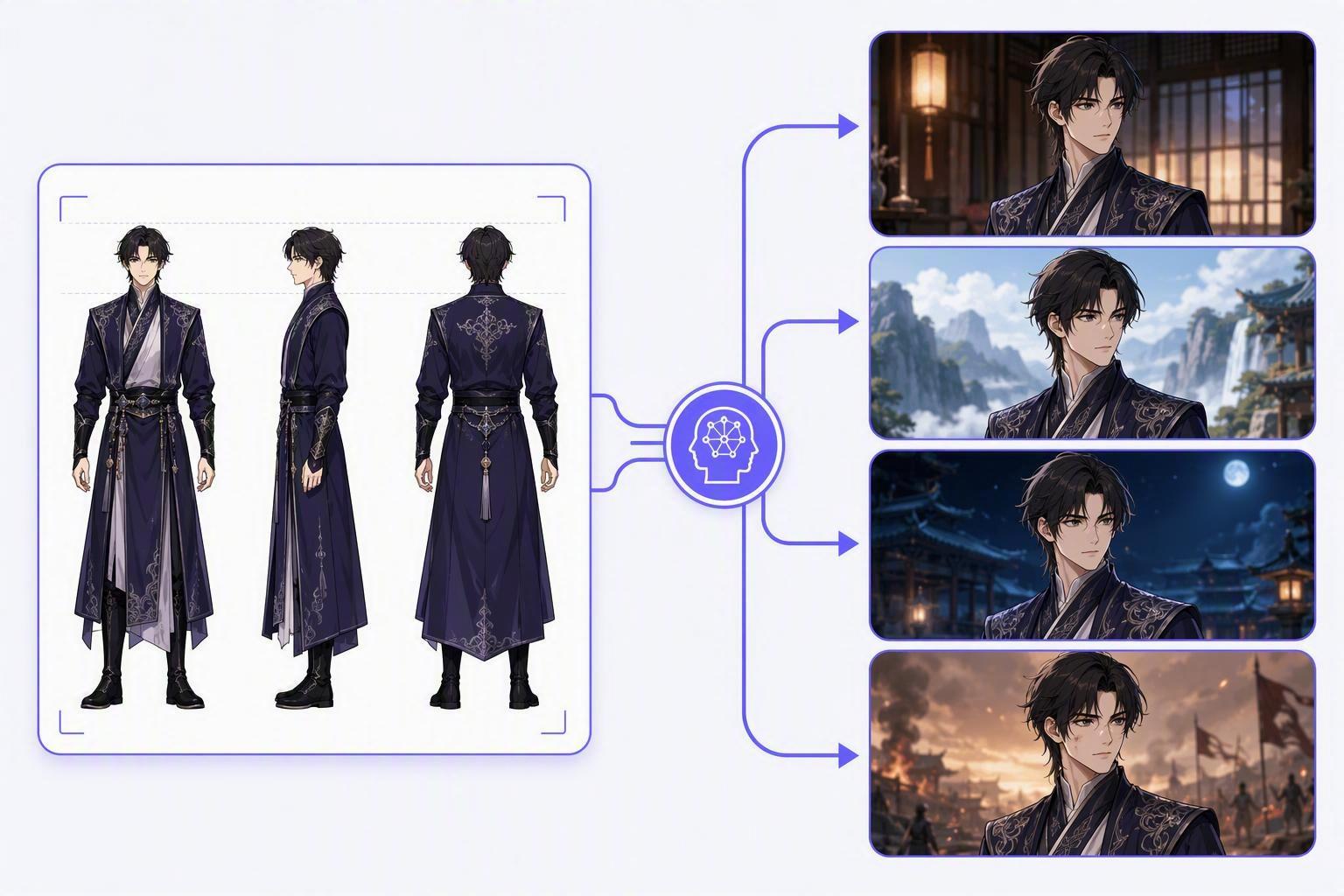
A locked character reference sheet — front, side, and back views — keeps identity consistent across every shot when reused as the anchor input.
3. Storyboard to Video Compared: First-Last-Frame, Image-to-Video, and Cinema Models
Anime and short drama both live or die on shot planning. A storyboard is how you control camera, blocking, and scene order before generation — and storyboard-to-video is the family of techniques that turns static panels into coherent moving shots.
There are three main routes, and they are not interchangeable. The first is image-to-video: you give the model a keyframe image and it animates it into motion. This is the closest to “here is the panel, make it move.” The second is first-last-frame: you provide a start frame and an end frame, and the model interpolates the motion between them — which is ideal for scenes where you know the setup and the payoff and want deterministic movement between the two. PixVerse’s first-last-frame generation is set up for exactly this, and it is often the most controllable route for a scripted beat.
The third route is a cinema-style model that treats a sequence of panels as one scene with a director’s sense of continuity. PixVerse C1’s cinematic storyboard mode is a good example of a model tuned for film-like composition across a panel sequence, which suits anime’s panel-driven grammar particularly well.
The baseline you will fall back on constantly is the animation entry point itself: image-to-video API generation turns a keyframe into motion, and it is the workhorse for turning storyboard stills into clips. The practical advice: use image-to-video for a single panel, first-last-frame for a planned beat with a clear start and end, and a cinema model when you need continuous composition across several panels.
4. Multi-Shot Storytelling Verified: Which Models Keep Scene Continuity
Once you can keep a character consistent and turn panels into motion, the next question is whether a model can hold the story across multiple cuts. Multi-shot storytelling is the newest and most demanding axis — it asks a model to keep a character, location, and emotional beat coherent across a sequence of generated shots, not just within one clip.
This is where seedance models have been pushing hardest. ByteDance pitches Seedance around native multi-shot storytelling on its official Seedance product page, and the Seedance 2.0 API is built for multi-modal, multi-shot work that has become the reference-driven backbone of branded character production. Because it accepts a mix of inputs, it can hold a scene across cuts more reliably than models that only take a single prompt.
When you need a faster, cheaper pass for the same kind of storytelling, the Seedance Pro API is worth comparing against the 2.0 line for length and speed trade-offs. And when you are planning the whole arc rather than a single scene, the text-to-video API overview is a good place to compare multi-shot options and pick the entry point that matches the length of story you are trying to hold.
The honest caveat: multi-shot continuity is not guaranteed on the first pass. Teams plan for retakes on the most complex beats, and they regenerate only the broken shot rather than the episode. That is normal, and it is exactly why the artifact-based pipeline pays off — you can isolate the failure to a single shot.
5. Motion Control Compared: Fight Scenes, Gestures, and Camera Moves
Short drama leans hard on action, and action is where a bare text prompt fails most visibly. Fight scenes, gestures, and camera moves all need motion control — the ability to steer where and how things move, rather than letting the model improvise.
The strongest tool for this is a dedicated motion-control capability. Kling’s motion control API is a reference point here because it exposes explicit control over character motion and camera behavior — the exact controls Kling’s own official user guide documents as best practices for choreographed action — which is what you need for a camera-locked fight or a fixed action beat. When a shot must be reproducible — a specific punch landing, a specific pan across a scene — motion control beats re-prompting by a wide margin.
The field is broader than a single vendor, though. AI motion control options compare the general approaches across providers, so you can judge which control style (trajectory, gesture, skeleton) fits the action you actually produce. For serialized content, prefer the control that reproduces a fixed action consistently, because that is what lets you reuse the same beat across episodes.
6. Dialogue Scenes Explained: Talking Avatar and Lip Sync Options
Serialized short drama is dialogue-heavy, and dialogue is the point where naive generation shows its limits. Most production teams render the visuals first, then add the spoken line in a second pass, rather than trying to generate perfect lip sync in one step.
Two API capabilities cover this. A talking avatar API animates a speaking character or presenter from a single image — useful for narration-heavy sections where a character addresses the audience directly. The talking avatar API is the entry point for this pattern. A broader AI avatar API covers the range of avatar generation and speech options if you need a fuller toolset. Either way, keep the spoken lines short and clean, and lean on subtitles for safety — face and mouth stability improves when the line is short.
The second pass still requires care: line up the dialogue to the beat, accept that perfect phoneme-level sync is not always achievable, and let on-screen text carry the parts that would otherwise force a costly regeneration.
7. Clip Length Verified: When to Extend Instead of Regenerating
Every short-drama team hits the same wall: the model returns a six-second clip when the scene needs fifteen. The expensive instinct is to regenerate and hope for a longer take. The cheaper one is to extend what you already have.
Video extension takes an approved clip and continues it — adding time to the same scene and motion rather than starting over. It is the right move when the existing clip is good but short, because it preserves the look you already locked. Regenerating, by contrast, is only worth it when the shot itself is wrong (bad motion, broken continuity), not when it is merely too short.
The video extend API covers this capability generally. If you are routing through PixVerse and want the provider-specific behavior, the PixVerse video-extend route shows how that implementation handles continued shots. The rule of thumb that holds in production: extend a good clip, regenerate a broken one.
8. Model Choice Compared: Seedance, Kling, PixVerse, and Wan for Drama Workflows
There is no single best model for short drama — there is a best model per shot type. The practical framework is to score models against the four things a drama workflow actually stresses: narrative continuity, action/motion, storyboard fidelity, and cost.
| Workflow need | Strong fit | Why it fits |
|---|---|---|
| Narrative continuity / branded characters | Seedance 2.0 | Multi-modal, multi-shot, reference-anchored |
| Action, motion control, social cuts | Kling | Explicit motion control, high-motion scenes |
| Storyboard / cinematic composition | PixVerse C1 | Panel-driven, film-like continuity |
| Affordable current-gen volume | Wan | Low-cost generation for high throughput |
| Fast, cheap previews | Fast-tier models | Momentum on composition before final render |
The two-way comparisons clarify the trade-offs. Seedance vs Kling is the central decision for most teams: identity retention and narrative depth versus motion energy and high-volume cost. For a creator-oriented pipeline, Wan 2.7 vs Seedance 2.0 shows how the two compare on a real creator workflow. On the premium-motion side, Kling vs Sora is a useful frame when you are choosing between high-motion and physics-driven options.
And because short-drama teams almost always end up using more than one model, the PixVerse API model options are worth a look as a routing layer that exposes several models behind a single interface.
9. A Practical 5-Step Pipeline You Can Ship This Week
You do not need to build a platform to get serialized video that holds together. This five-step workflow pulls together what the earlier sections covered into an order that works on real projects.
- Build the character reference. Create a front/side/back sheet for every recurring character. Lock one approved reference image per character and reuse it across all their shots.
- Lock storyboard stills. Sketch or generate a panel per beat, one still per planned shot. Use a cinema storyboard model where you need continuous composition.
- Generate each shot from the locked asset. Use reference-to-video for talking heads and identity-critical shots, first-last-frame or image-to-video for planned beats, and motion control for action.
- Add dialogue and motion reinforcement. Layer talking-avatar or lip sync over approved visuals; add subtitles so short lines stay readable.
- Extend what is short. Use video extension to reach target length on good clips; regenerate only broken ones.
The two capabilities that tie this together most often are a strong reference anchor and a reliable extension step — the identity-retention route covered in section 2 and the storyboard-driven continuity covered in section 3. If you set up those two correctly, the rest of the pipeline slots in on top of them.
Key Takeaway: The whole pipeline is one rule — build the asset, lock the plan, generate per shot, add dialogue, extend. Do that and the serialized episodes stop drifting.
Next Steps
The fast way to move from planning to shipping is to stop thinking in single models. If you want to compare model behavior side by side and route each shot type through the right API without managing a dozen provider accounts, Modellix models give you a single key across the image, video, and audio generation you need for a serialized launch. Reach out at marketing@modellix.ai or join the Discord if you want to test the pipeline against your own cast.
All model capabilities and API behaviors referenced in this article are verified against official documentation from Seedance, Kling, PixVerse, and Modellix as of August 25, 2026. Model capabilities, pricing, and availability change without notice — verify against the linked pages. Modellix offers Seedance, Kling, PixVerse, Wan, and other video generation models with unified API access and pay-as-you-go billing. We have a commercial interest in the comparisons above.