

There is no single best AI video generation API. The right choice depends first on what you generate: cinematic footage, UGC ads, reference-image video, native-audio clips, or high-volume drafts. After that, clip length, resolution, price, and latency usually eliminate most of the remaining options.
This guide does three things in that order. It shows what we measured with real MP4 output, gives you a filter to narrow the field for your own product, and then covers the ten API routes worth testing, each with a clear “skip it if.”
Best AI Video APIs at a Glance
If you only read one table, read this one. It is the short answer.
| If you need… | Start with | Why | Evidence |
|---|---|---|---|
| Cinematic quality | Google Veo 3.1 Fast | Premium visual baseline, fast iteration | Real MP4 test |
| UGC and product ads | Seedance 2.0 I2V | Image-led workflow from product stills | Vendor demo clip |
| Storyboards and social motion | Kling V3 | Strong motion, 3 to 15 s, native audio switch | Real MP4 test |
| One shot longer than 15 s | Seedance 2.5 T2V or Wan 3.0 T2V | Both publish a 30-second ceiling | Route schema |
| Low-cost testing | Wan 3.0 T2V or Vidu Q3 Pro | Lowest per-second floors in the price table | Price table |
| Physics and camera moves | Hailuo 2.3 | Camera-command prompts, 1080P at 6 s | Real MP4 test |
| Native audio | Kling V3 or Seedance 2.5 | Audio generated in the same call | Route schema |
| Premium reference video | Veo 3.1 I2V | First and last frame control on a general route | Route schema |
Three of the May test routes have since been replaced on Modellix: Seedance 1.5 Pro now redirects to Seedance 2.0 T2V, and Wan 2.6 and Kling V2.6 Audio are retired. Their MP4 results stay below as evidence for the model families, and the picks point to the live successors.
First: What Kind of Video API Do You Need?
“Video API” covers four different products. Knowing which one you need removes half the search results.
| API type | What it returns | Example products | Example use |
|---|---|---|---|
| Generative model API | Newly generated footage | Veo, Kling, Seedance, Wan, Hailuo | Ads, creative tools, video features in your app |
| Multi-model API | Access to many generative models through one key | Modellix, fal, Replicate | Routing and model switching |
| Finished-video API | An assembled video with voice and captions | HeyGen, Synthesia | Bulk explainers, training, localization |
| Render or template API | Deterministic composition from your assets | Shotstack, Creatomate | Personalized branded video |
This guide compares generative model APIs and the routes that serve them.
Studio tools such as Runway, Luma, and Pika matter for creators, but a subscription price and a per-second API price cannot be divided into each other. Many teams use both: a studio tool to explore motion, then an API route once a winning prompt needs to repeat at volume.

How We Tested These AI Video Models
We generated MP4 output from six model families in our May 2026 test batch, using the same async workflow developers use in production through Modellix: submit a model task, poll the task result endpoint, then save the returned file before the temporary URL expires.
Speed was measured with one shared timing prompt: a centered, minimal scene with no text, logos, or subtitles. A good API benchmark should not hide model behavior behind a crowded prompt. It should answer three practical questions:
- Does the model follow a clean centered composition?
- Does the model produce the requested duration and ratio?
- How long did the async job take from submit to downloadable result?
The clips embedded in each model section are a separate cinematic pass. Each model got a creative brief in its strongest style, from science fiction to product and landscape, so you can judge range instead of watching the same minimal scene six times.
Real MP4 Benchmark Results
| Model API | Requested output | Actual local duration | Task elapsed |
|---|---|---|---|
| Google Veo 3.1 Fast T2V | 16:9, 6s, 720p | 6.0s | 49.21s |
| Kling V3 T2V | 16:9, 5s, 1080p | 5.042s | 110.5s |
| Seedance 1.5 Pro T2V | 16:9, 5s, 1080p | 5.042s | 90.21s |
| Wan 2.6 T2V | 16:9, 5s, 1080p | 5.008s | 70.65s |
| HappyHorse 1.0 T2V | 16:9, 5s, 1080p | 5.163s | 152.84s |
| Hailuo 2.3 T2V | 16:9, 6s, 1080p | 5.875s | 193.5s |
Every model stayed within a fraction of a second of the requested duration. The real spread is time to result: Veo 3.1 Fast finished in under a minute, while Hailuo 2.3 took more than three.
These are single-run numbers from one batch, not a speed guarantee. Run your own target prompt, region, and concurrency before you commit.
How to Choose an AI Video Generation API
Rankings disagree because they measure different things. The constraints published in each route’s request schema do not, so apply them first and let price decide what survives.
1. Eliminate models by clip length
Wan 3.0 and Seedance 2.5 reach 30 seconds, and most current routes stop at 15. Some ceilings are discrete sets rather than ranges: Veo 3.1 accepts only 4, 6, or 8 seconds, and Hailuo 2.3 only 6 or 10. If your product renders a fixed 12-second slot, Kling V3 can return 12 seconds and Hailuo 2.3 cannot.
2. Check resolution constraints
The Veo 3.1 docs state that 1080p and 4K are only available at an 8-second duration, which is why the Veo benchmark above ran 6 seconds at 720p. Hailuo 2.3 couples the other way: a 10-second clip only supports 768P, so a 1080P Hailuo 2.3 clip is a 6-second clip, while Hailuo 02 renders 1080p up to 10 seconds.
3. Check native audio, including the default
“Supports audio” is not enough; check what an unset field does. Seedance 2.0 and 2.5 and Wan 3.0 generate audio unless you turn it off, while PixVerse V6 returns silence until you turn it on. Hailuo 2.3, MiniMax H3, and Grok Imagine publish no audio field, so treat audio there as unverified.
If you bring your own voice track, a silent route plus a lip-sync route such as vidu/lip-sync may fit better. Price both calls before deciding.
4. Check input and reference control
Only google/veo-3.1-i2v exposes a last-frame input on a general route (lastFrame, which forces duration to 8). Elsewhere, first-and-last-frame control lives in dedicated -fl2v routes from MiniMax, Vidu, and PixVerse. Seedance’s return_last_frame returns the final still as an output; it does not condition the generation.
Reference-image limits also differ: up to 9 on bytedance/seedance-2.0-v2v, 4 on alibaba/wan2.7-videoedit, and 3 on google/veo-3.1-i2v.
5. Compare price per usable clip
Many “best AI video API” pages list prices as if every generated second is equivalent. Production does not work that way. A cheaper model becomes expensive if you discard most of its clips, and retries after rate limits or rejected parameters add to the bill.
| Metric | Why it matters |
|---|---|
| Cost per generated second | The base number for video API budgeting |
| Successful clip rate | A cheaper model can become expensive if the discard rate is high |
| Duration constraints | A 4, 5, 6, or 8 second minimum changes ad creative planning |
| Resolution constraints | 720p, 1080p, and 4K are not interchangeable in production |
| Retry behavior | Rate limits and failed parameters shape real cost |
6. Compare latency
Task time decides whether a feature can feel interactive. In the benchmark above, results ranged from 49 seconds to more than three minutes. For a synchronous user experience, that gap matters more than a small price difference.
The 10 Best AI Video Generation APIs
Each pick lists what it is best for, what evidence stands behind it, and when to skip it.
1. Google Veo 3.1 Fast API: Best Premium Cinematic Baseline
Best for: premium cinematic review and a quality baseline. Evidence: real MP4 test (49.21 s to result).
Google Veo remains the first model many buyers ask about because the brand signal is strong and the output quality is credible for premium creative review. Veo 3.1 Fast is especially useful when you need a high-end visual baseline before comparing cheaper options. For endpoint setup and duration rules, use the dedicated Veo 3.1 API guide.
Use it when:
- Your buyer expects a premium model name in the comparison.
- You are testing cinematic output rather than high-volume low-cost generation.
- You need a clean baseline before deciding whether Kling, Seedance, Wan, or Hailuo can satisfy the same creative brief.
Skip it if: you need clips longer than 8 seconds, or 1080p at any length other than 8 seconds.
Tradeoff: the Veo family has model-specific duration and resolution rules. In our benchmark, Veo 3.1 Fast used 6 seconds at 720p because the documented duration options did not match a 5 second 1080p test. This is exactly why API buyers should verify parameters before committing to a model.
2. ByteDance Seedance 2.0 I2V API: Best For UGC Ad Variants
Best for: product-led ads from still images. Evidence: ByteDance demo clip; image-to-video was not part of the timing batch.
Seedance 2.0 I2V belongs near the top when the job is UGC ads. A real ad workflow often starts from a product shot, a creator reference, a lifestyle photo, or a branded still image. That makes image-to-video control more important than pure prompt novelty.

Use it when:
- You are generating product-led social clips from still assets.
- You need reference image control for consistent visuals.
- You are testing many ad variants and need a fast model path.
Skip it if: you do not have clean source images; pure text-to-video routes will serve you better.
Tradeoff: image-to-video workflows require stronger asset hygiene. Bad input images produce bad video outputs faster than a bad prompt does.
3. Kling V3 API: Best For Storyboards and Social Motion
Best for: expressive motion, storyboards, and social clips. Evidence: real MP4 test (110.5 s to result) plus an earlier Kling research clip.
Kling V3 is a strong pick for short-form video tools, social creative workflows, motion-heavy ads, and story-driven clips. It supports 3 to 15 seconds, pro mode gives teams a quality control knob, and the audio field switches native sound on or off.
Kling 4.0 is announced for October 2026 with native 30-second clips. See what changes from Kling V3 to Kling 4.0.
We also include an earlier Kling research clip because this brand matters for motion comparison, not just the timing batch.
Use it when:
- You need expressive motion rather than a static product pan.
- You want native audio without a separate audio pipeline.
- You are building a creator workflow where storyboard or sequence control matters.
Skip it if: your product needs the fastest possible result; Kling V3 took more than twice as long as Veo 3.1 Fast in our batch.
Tradeoff: stronger controls also mean more configuration choices. Developers should treat Kling as a model family, not one endpoint.
4. ByteDance Seedance 2.0 T2V API: Best 1080p to 4K Text-to-Video
Best for: clean text-to-video at 1080p and above. Evidence: the May test ran on Seedance 1.5 Pro, which now redirects to this route.
Seedance 1.5 Pro was the cleanest option in our batch for a 5 second 1080p text-to-video test. It accepted a clean ratio plus resolution request and returned a 1920 by 1080 MP4 without parameter friction. On Modellix, that route now redirects to Seedance 2.0 T2V, which extends the range to 4K and generates audio by default.
Use it when:
- Your first requirement is 16:9, 1080p or higher, short-form T2V.
- You want a model that fits quick iteration loops.
- You want a ByteDance text route next to Seedance 2.0 image-to-video.
Skip it if: you need a narrow, predictable price; the Seedance 2.0 T2V range runs from $0.0700 to $0.7800 per second depending on resolution.
Tradeoff: audio is on by default. Send generate_audio: false if you need a silent file.
5. Alibaba Wan 3.0 API: Best Affordable Route, Now Up to 30 Seconds
Best for: low-cost exploration and long single shots. Evidence: the May test ran on Wan 2.6, which is now retired; Wan 3.0 capabilities are from the route schema.
Wan 2.6 produced the fastest completed result among the 1080p routes in our batch: 70.65 seconds from submit to success. It also exposed a useful developer reality: the endpoint rejected unsupported fields on the first attempt and returned the exact allowed parameter list.
Wan 3.0 T2V (alibaba/wan3.0-t2v) is the live successor. It generates 2 to 30 seconds at up to 1080P, accepts a prompt, an uploaded file_url, or a public link_url as the starting point, and starts at $0.0500 per second, just above Vidu Q3 Pro’s floor in the table below.
Use it when:
- You want a low-friction, low-cost 16:9 text-to-video option.
- One continuous shot must run longer than 15 seconds.
- You are comparing cost and throughput before picking a premium model.
Skip it if: you need 4K output.
Tradeoff: the audio field defaults to true, so send false explicitly for a silent file. And do not assume provider fields are interchangeable; a field that works for one model may fail for another.
6. MiniMax Hailuo 2.3 API: Best For Physics and Camera Commands
Best for: prompts that depend on physical motion and camera moves. Evidence: real MP4 test (193.5 s to result).
Hailuo 2.3 is a good candidate when your prompt depends on physical motion, camera moves, or object behavior. For the timing pass we used a motion brief with an added camera cue, which fits the way Hailuo workflows are commonly designed.
Use it when:
- Prompted camera movement is central to the product.
- Your team tests physical realism rather than only texture quality.
- You need a MiniMax option in a multi-provider model router.
Skip it if: users wait on the result in real time; it was the slowest route in our batch.
Tradeoff: 1080P is only available on 6-second clips, and the route publishes no audio field.
7. Alibaba HappyHorse API: Best Physical Realism Candidate
Best for: believable object behavior in short clips. Evidence: real MP4 test on HappyHorse 1.0 (152.84 s to result); HappyHorse 1.1 is also live.
HappyHorse deserves a separate slot from Wan because it is not just another Alibaba endpoint. It is a useful candidate when you want short clips that prioritize physical plausibility and clean motion rather than broad provider coverage.
Use it when:
- You are testing motion realism across different model families.
- You want a model option outside the usual Veo versus Kling comparison.
- Your application needs believable object behavior in short clips.
Skip it if: cost per second is your main filter; HappyHorse 1.1 starts at $0.1400, about three times Wan 3.0’s floor.
Tradeoff: the benchmark completed slower than Wan and Seedance, but its price range is one of the narrowest in the table, which makes budgets easy to forecast.
8. ByteDance Seedance 2.5 T2V API: Best for Native Audio and 30-Second Shots
Best for: one-call clips with sound, up to 30 seconds. Evidence: capabilities verified from the route schema; not part of the May timing batch.
Most video generation pipelines treat audio as a second system: generate the clip, generate or upload audio, then sync the result. Seedance 2.5 T2V (bytedance/seedance-2.5-t2v) generates 4 to 30 seconds at up to 1080p, in mp4 or mov, with generate_audio on by default.
Use it when:
- You are building ad creatives that need sound.
- A script needs one continuous shot longer than 15 seconds.
- You want talking, ambience, or synced effects without stitching tools together.
Skip it if: you only need short silent clips; a 30-second 1080p run costs several times a short 480p one.
Tradeoff: a 30-second 1080p run and a 4-second 480p run are very different purchases. Test whether the audio quality fits your brand before relying on it; for some products, a separate audio model is easier to approve.
9. Google Veo 3.1 I2V API: Best Reference-Guided Premium Video
Best for: premium output from a controlled starting image. Evidence: capabilities verified from the route schema.
Veo 3.1 I2V is the premium reference-guided option. It is a better fit than pure T2V when the user already has a product image, a visual style, or a shot that must be preserved, and it is the only general route with a last-frame input.
Use it when:
- You need premium output from a controlled starting image.
- You are creating high-value product or campaign previews.
- You need up to 3 reference images for style or subject continuity.
Skip it if: you are generating large batches; use it for final candidates, not every exploratory pass.
Tradeoff: premium I2V can be expensive at volume, and a last-frame input forces an 8-second duration.
10. Alibaba Wan 2.7 R2V API: Best For Consistent Product and Character Workflows
Best for: visual continuity across a set of clips. Evidence: capabilities verified from the route schema; Wan 2.6 R2V now redirects here.
Text-to-video is easy to demo, but reference-to-video is often more useful in production. Wan 2.7 R2V is worth tracking for workflows where character, object, or product consistency matters.
Use it when:
- You need visual continuity across a set of clips.
- You want Alibaba model coverage beyond a single T2V endpoint.
- Your product uses images as the source of truth.
Skip it if: you have no stable reference set yet.
Tradeoff: reference workflows are only as reliable as the reference strategy. Standardize input image size, composition, and naming before running high-volume jobs.
AI Video API Pricing Compared
The table below lists text-to-video routes as read from each Modellix model page. Every price is a range because resolution, duration, or a mode switch moves you along it. The 10-second column uses the floor price, so it is the cheapest possible 10 seconds, not a typical one.
| Route | List price per second | Approx. 10 s at floor | Max clip | Max resolution | Audio |
|---|---|---|---|---|---|
vidu/viduq3-pro-t2v |
$0.0450 to $0.1200 | $0.45 | 16 s | 1080p | Native, no switch |
alibaba/wan3.0-t2v |
$0.0500 to $0.2000 | $0.50 | 30 s | 1080P | audio, default on |
pixverse/v6-t2v |
$0.0500 to $0.2300 | $0.50 | 15 s | 1080p | generate_audio_switch, default off |
minimax/hailuo-2.3-t2v |
$0.0504 to $0.0738 | $0.50 | 10 s (6 or 10 only) | 1080P at 6 s | Not published |
bytedance/seedance-2.0-fast-t2v |
$0.0600 to $0.1200 | $0.60 | 15 s | 720p | generate_audio, default on |
kling/kling-v3-t2v |
$0.0672 to $0.3360 | $0.67 | 15 s | 4K | audio: native or off |
bytedance/seedance-2.0-t2v |
$0.0700 to $0.7800 | $0.70 | 15 s | 4K | generate_audio, default on |
minimax/minimax-h3-t2v |
$0.0800 to $0.1300 | $0.80 | 15 s | 2K | Not published |
xai/grok-imagine-video |
$0.0840 to $0.1080 | $0.84 | 15 s | 720p | Not published |
google/veo-3.1-fast-t2v |
$0.0900 to $0.2700 | $0.72 for 8 s max | 8 s | 4K at 8 s | Native, no switch |
bytedance/seedance-2.5-t2v |
$0.1030 to $0.5690 | $1.03 | 30 s | 1080p | generate_audio, default on |
alibaba/happyhorse-1.1-t2v |
$0.1400 to $0.1800 | $1.40 | 15 s | 1080P | Native, no switch |
google/veo-3.1-t2v |
$0.3600 to $0.5400 | $2.88 for 8 s max | 8 s | 4K at 8 s | Native, no switch |
Budget the tier you will actually send, not the floor. At 1080p the same read runs from $0.0738 per second on Hailuo 2.3 to $0.5690 on Seedance 2.5, while Veo 3.1 charges the same $0.3600 at 720p and 1080p and only steps to $0.5400 at 4K.
Scaled to one minute of output at each floor price, the list spans $2.70 on Vidu Q3 Pro to $21.60 on Veo 3.1. The narrow ranges (HappyHorse 1.1 and Grok Imagine at 1.29x, Hailuo 2.3 at 1.46x) are the easiest to forecast, which is a different virtue from being cheap.
This page answers which API to pick; price is one input. For the full 112-model table and monthly volume math, see the AI video model API pricing comparison.
Best AI Video API by Use Case
| Use case | Best first test | Backup test |
|---|---|---|
| Premium cinematic output | Google Veo 3.1 Fast | Kling V3 |
| UGC ad variants | Seedance 2.0 I2V | Kling V3 |
| Social and creator motion | Kling V3 | Seedance 2.0 T2V |
| 1080p to 4K text-to-video | Seedance 2.0 T2V | Kling V3 |
| Affordable batch exploration | Wan 3.0 T2V | Vidu Q3 Pro |
| One shot longer than 15 s | Seedance 2.5 T2V | Wan 3.0 T2V |
| Physical realism | Hailuo 2.3 | HappyHorse 1.1 |
| Native audio | Kling V3 | Seedance 2.5 T2V |
| Product reference video | Google Veo 3.1 I2V | Wan 2.7 R2V |
For image-to-video, keep the first test small and fixed so the model is the only variable:
- One approved product image or campaign still, reused across every route.
- Two motion directions, such as a clean product turn and a handheld lifestyle shot.
- One short clip per route, scored on product fidelity (packaging, logo shape, composition), motion clarity, and editability.
- A check of watermark, export quality, and commercial-use terms before any clip reaches paid media.
- A cost projection for 50, 500, and 5,000 clips using the price table above and your observed discard rate.
If your evaluation is also about platforms rather than models alone, compare this list with the Replicate alternatives guide to separate model quality from billing model, cold-start behavior, and catalog strategy.
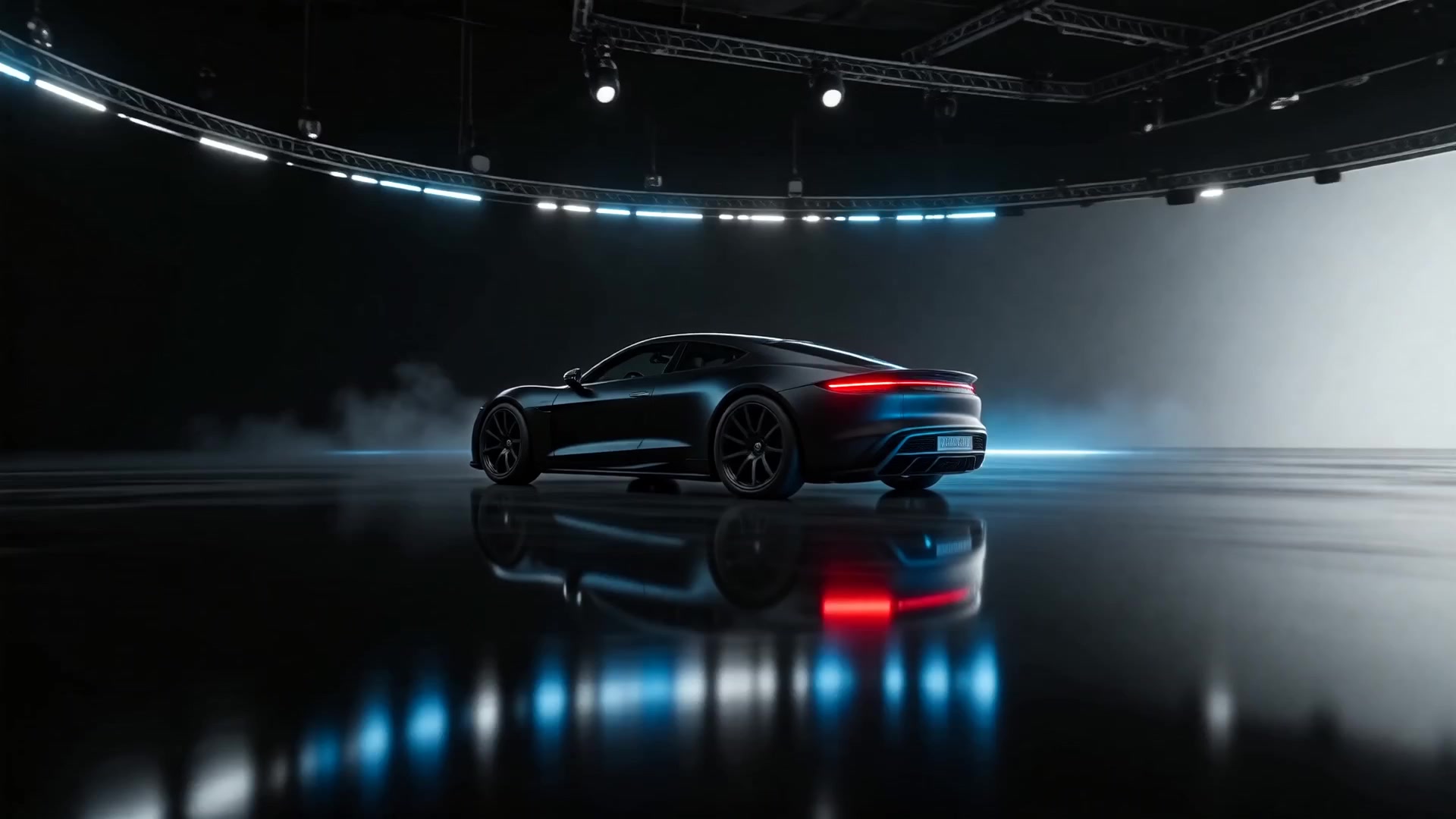
Modellix collection
Shortlist AI Video Models for Production
Compare text, image, and reference-led video workflows across multiple models from one production surface.
Good first tests: Seedance 2.0Wan 2.7HappyHorse 1.1
Explore the collectionWhat Integration Looks Like
Most production AI video APIs are asynchronous, because a synchronous request would time out while the model renders. The pattern is the same across the routes above:
- Submit a model request.
- Store the returned
task_id. - Poll the task result endpoint.
- Download the generated resource URL.
- Save the file, because temporary result URLs expire.
Here is the submit step for the Veo 3.1 Fast benchmark request, followed by the poll:
1 | curl -X POST "https://api.modellix.ai/api/v1/google/veo-3.1-fast-t2v" \ |
The syntax matters less than the lifecycle: a task table, retry rules, a status display, and a downloader that stores output before the URL expires. The full walkthrough, including webhooks and batch runs, is in the video generation API guide.
Test Your Shortlist Before You Integrate
A benchmark narrows the field. Your own prompt decides the winner. The fastest way to get there is to run two or three models on the same brief before anyone writes integration code.
Step 1: Pick two or three models from the table above
Choose by use case, not by rank. A UGC ad team might shortlist Seedance 2.0 I2V, Kling V3, and Veo 3.1 I2V. A budget batch pipeline might shortlist Wan 3.0, Vidu Q3 Pro, and Hailuo 2.3.
Step 2: Run the same prompt in the Playground
Sign in to Modellix, add a small test balance, and open each route from the model catalog. Use prompt enhancement when the brief is too thin, and keep the prompt identical across models so the model is the only variable. The example below uses Vidu Q3 Mix R2V.

Step 3: Compare output, latency, and cost
Check whether each result matches the prompt, motion, framing, and output format you need. Note time to result and the cost shown for the run.

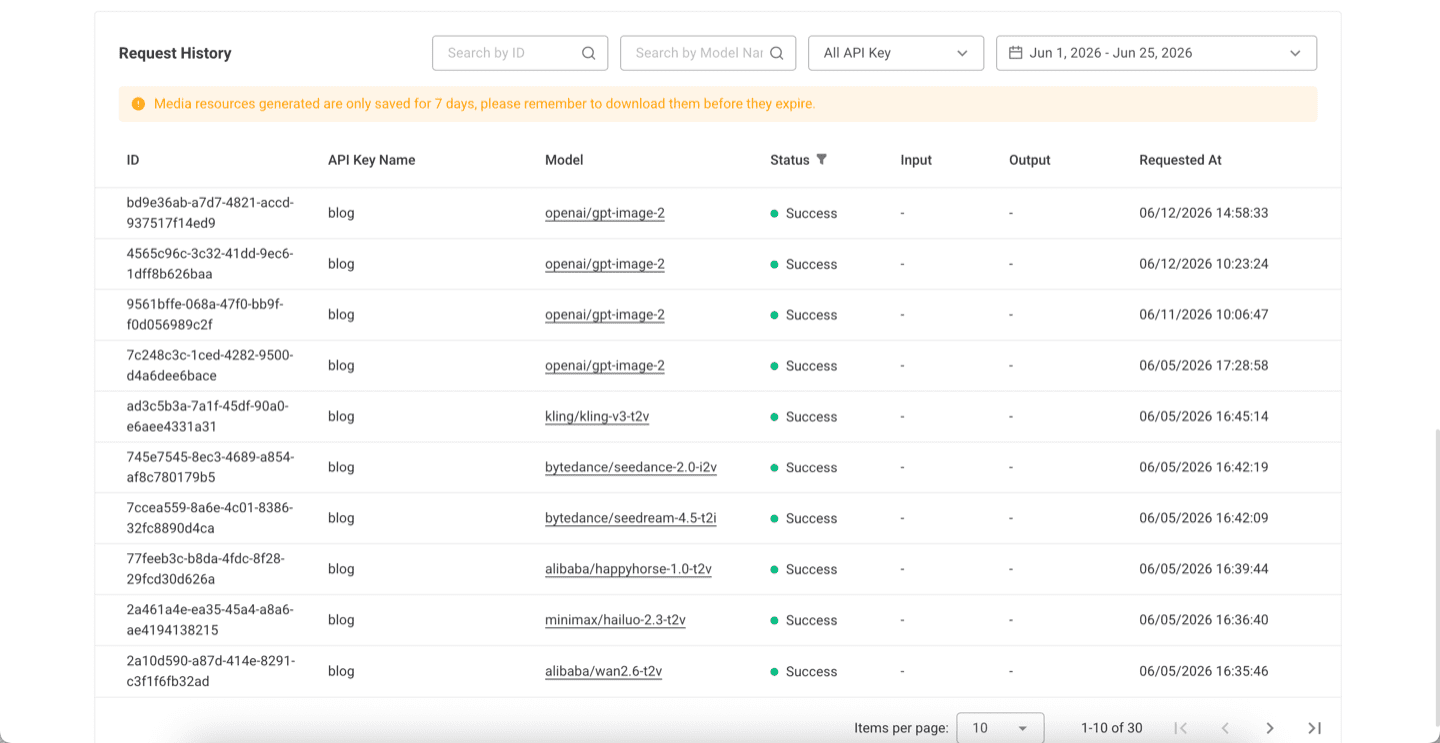
Step 4: Automate the winner
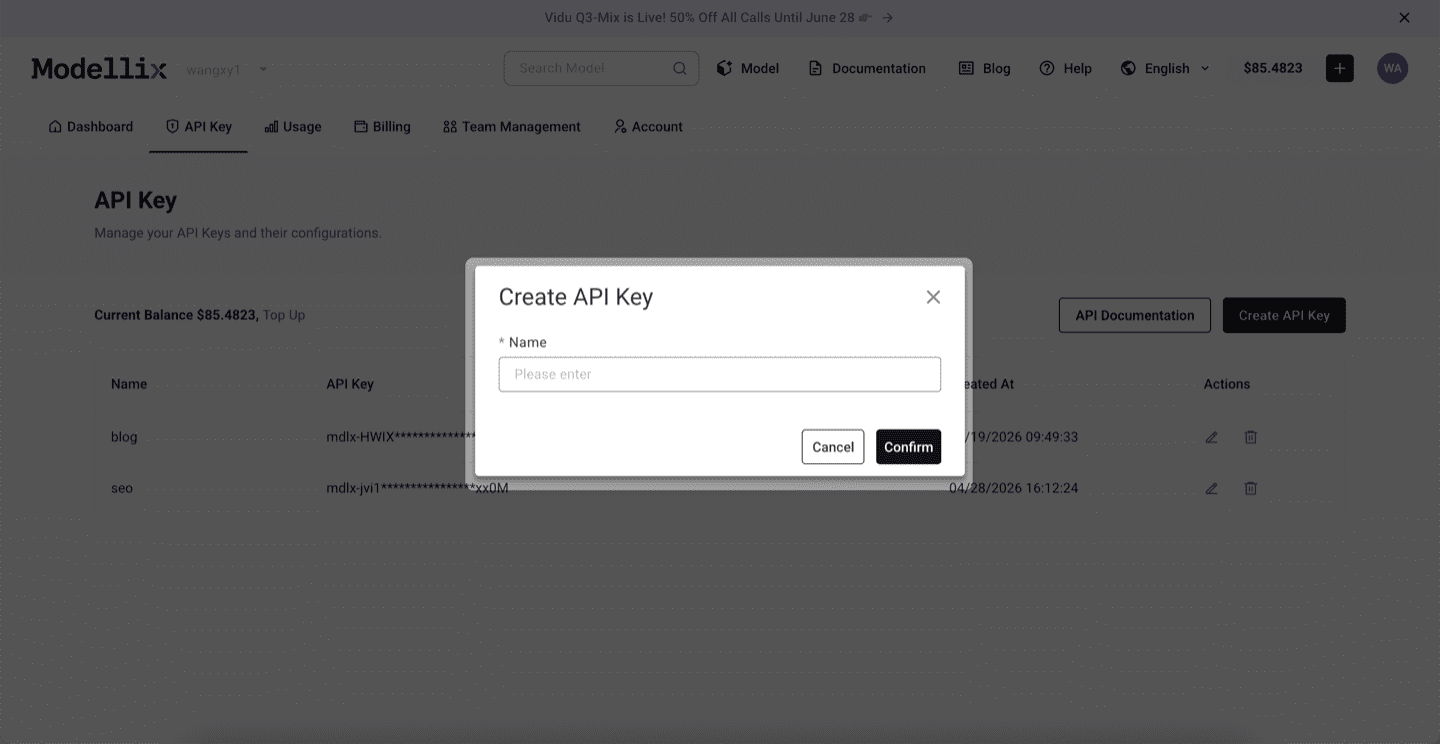
Create an API key only when a backend service, agent, batch script, or CLI workflow needs to repeat the winning prompt. Then check request history before you scale: it confirms the model slug, key name, task status, and result retention window.
Step 5: Check Logs and Save the Result Before Scaling
Before scaling from one manual run to repeated API, Skill, or CLI usage, review request history. Logs confirm the model slug, API key name, task status, request time, and result retention window, which makes the workflow easier to debug after it leaves Playground.
Run your shortlist on one key
Veo, Seedance, Kling, Wan, and Hailuo run through the same async task workflow on Modellix. Test two or three on your own prompt, compare the results and cost in one place, then automate the winner.
FAQ
What is the best AI video generation API in 2026?
It depends on the job. For premium output, Google Veo 3.1 Fast is the best first benchmark. For social motion, test Kling V3. For low-cost 1080p text-to-video, start with Wan 3.0. For physical realism, compare Hailuo 2.3 and HappyHorse. For one shot longer than 15 seconds, test Seedance 2.5 or Wan 3.0.
What is the best AI video generation API for developers?
The one that gives predictable async jobs, clear model parameters, downloadable results, per-second pricing, and enough model coverage to switch when a prompt fails. That usually means evaluating a multi-model API rather than a single model endpoint.
What is the best AI video API for UGC ads?
Start with Seedance 2.0 I2V for reference-image workflows, then compare Kling V3 for motion and Veo 3.1 I2V for premium final renders. UGC ads depend heavily on reference assets, so image-to-video support matters more than pure text-to-video quality.
Which AI video API is cheapest?
In the price table above, Vidu Q3 Pro has the lowest floor at $0.0450 per second, and Hailuo 2.3 has the lowest 1080p tier at $0.0738. The real answer depends on duration, resolution, and discard rate: a model with a higher nominal price can be cheaper if more of its clips are usable.
Which AI video API supports 1080p or 4K?
Most current routes support 1080p in the right mode, including Kling V3, Seedance 2.0 and 2.5, Wan 3.0, Hailuo 2.3, and HappyHorse 1.1. For 4K, the options are Kling V3, Seedance 2.0 T2V, and the Veo 3.1 family, and Veo 3.1 requires an 8-second duration for both 1080p and 4K.
What is the longest clip a video API can generate in one call?
30 seconds: Wan 3.0 T2V and Seedance 2.5 T2V both publish that ceiling. Most other routes stop at 15 seconds, and the Veo 3.1 family stops at 8. Longer videos mean extension routes or several generations stitched together downstream.
Can developers access Veo, Kling, Seedance, Wan, and Hailuo through one workflow?
Yes. Modellix exposes these model families through a consistent async task workflow: submit a task, poll for status, then retrieve generated resources. The request body still differs by provider, so validate parameters per model rather than copying fields.
Final Recommendation
Do not choose one AI video generation API from a brand list alone. Run a fixed prompt across the models that match your use case, record task time and output quality, then route by intent:

- Veo 3.1 for premium review and reference-guided finals.
- Seedance 2.0 for UGC ad variants and 1080p to 4K text-to-video.
- Kling V3 for motion, storyboards, and native audio.
- Wan 3.0 for affordable exploration and 30-second shots.
- Seedance 2.5 for native audio in one long call.
- Hailuo and HappyHorse for physical realism tests.
That approach turns “best AI video API” from a subjective list into a production decision your engineering and creative teams can both understand.
![AI Anime Video Generator [Full Guide]: Free vs Paid vs API](https://img.modellix.ai/en/article/cover-ai-anime-video-generator.webp)
![AI Animation Generator [No Code]: 4 Ways, Free to 4K](https://img.modellix.ai/en/article/cover-ai-animation-generator.webp)
![AI Movie Maker [No Code]: Make a 30s Trailer for Under $10](https://img.modellix.ai/en/article/cover-ai-movie-maker.webp)