
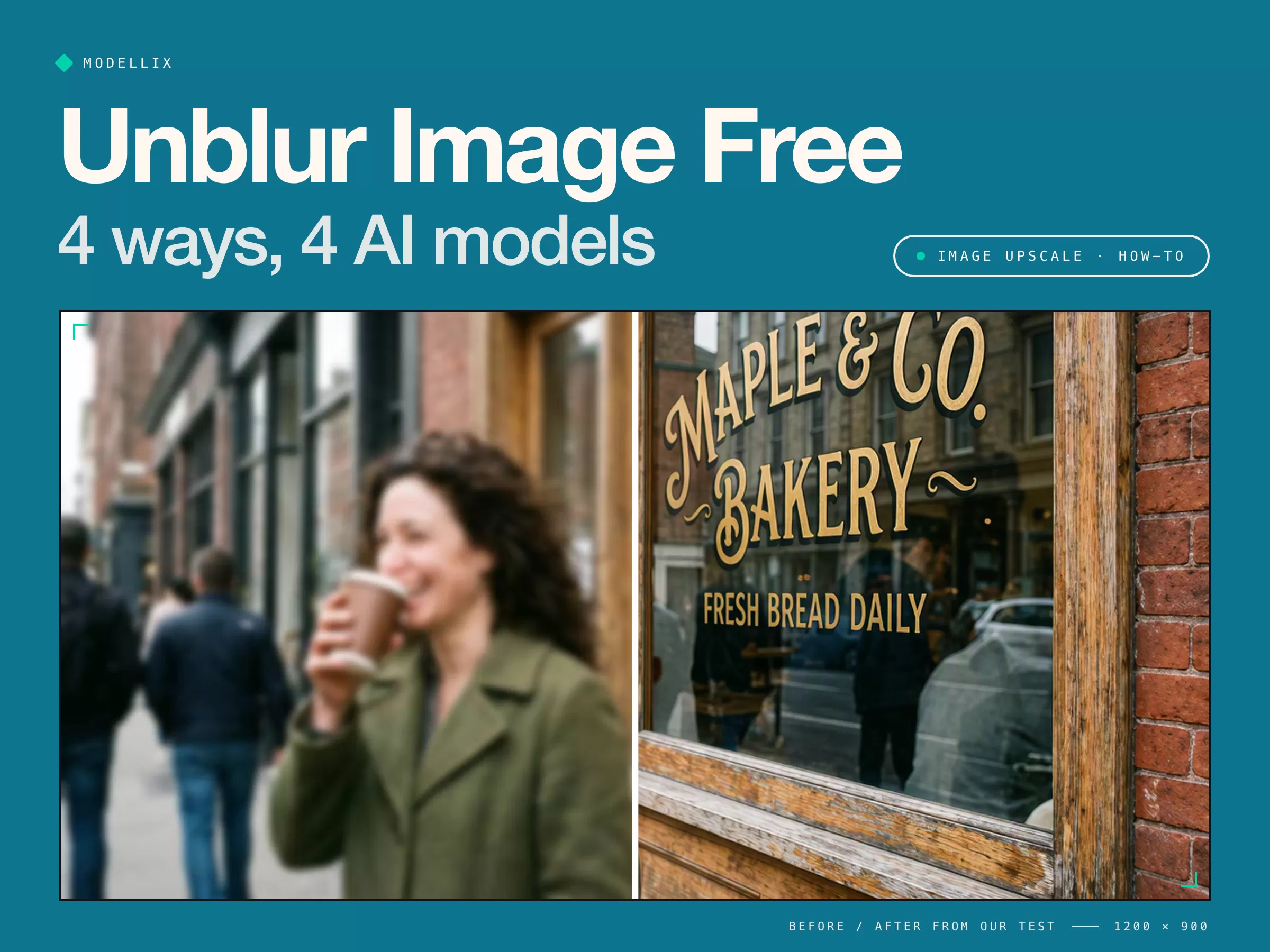
A blurry photo can be fixed for free on your phone, in a browser, or in a photo editor. AI tools go further and rebuild detail that is no longer in the file.
That last part is the catch: rebuilt detail is a guess. We blurred a sharp photo on purpose, ran it through four AI models, and measured how close each one got to the original. All four restored a hand-painted sign word for word; only some kept the woman's face.
Below are the four ways to unblur an image, what each costs, and which AI model to use for faces, text, or full-resolution output.

Unblur Image Free: 4 Ways at a Glance
| Way | Cost | Recovers lost detail | Keeps faces faithful | Many photos |
|---|---|---|---|---|
| 1. Your phone's photo app | $0 | Varies | Varies | No |
| 2. Free online unblur tools | $0 to start | Yes | Varies | No |
| 3. Sharpening in a photo editor | $0 (GIMP) | No | Yes | No |
| 4. AI image models via API | From $0.035 per image | Yes | Varies | In batches |
Way 1: Unblur on Your Phone
Google Photos has a Photo Unblur tool on Google Pixel phones (Pixel 7 and later). Open the photo, tap Edit, and look for Unblur. It works on older photos too, not just ones taken on the phone.
It is the quickest fix for camera shake and slight focus misses. It is not available on every phone, and you cannot choose how strongly it rebuilds faces.
Way 2: Free Online Unblur Tools
Search "unblur image free" and the first page is all tools: Canva, Picsart, Adobe Express, PicWish, Pixelbin, and Topaz Labs among them. Upload, click, download.
Free-tier catches
- Small or watermarked downloads. Many free plans cap the export size or brand the result.
- Daily limits and sign-up walls. Fine for one photo, slow for a folder.
- Your photo leaves your device. Check the privacy policy before uploading people, documents, or anything private.
- No control over the model. If the face comes back as someone else, there is no second model to try.
Way 3: Sharpen in a Photo Editor
Photoshop and the free editor GIMP both have Unsharp Mask. It raises contrast along edges, which makes slightly soft photos look crisper and never invents anything.
The limit: sharpening cannot bring back detail the blur erased. On a photo as soft as our test image, it only makes the blur look grainier. Use it for mild softness, and Way 4 for real blur.
Way 4: AI Image Models via API
General AI edit models unblur from a plain-English instruction: upload the photo, say what to sharpen and what to keep, and pay per image. You pick the model, which matters, because the next section shows they fail in different ways.
AI Unblur Image Test: 4 Models on One Blurry Photo
We generated a sharp street photo with Nano Banana Pro, including a hand-painted sign with a small second line, "FRESH BREAD DAILY". Then we shrank it to 1000 x 747, applied a strong Gaussian blur, and saved it as a compressed JPEG, like a bad phone shot.
We sent one instruction to four models through the Modellix unified API for image, video, and LLM models and compared each result with the sharp original using SSIM, a similarity score where 1.00 means identical.
Instruction sent to every model
Unblur and sharpen this photo. Recover fine detail in the face, hair, coat and the sign on the window. Keep everything else the same: same person, expression, colors, framing and text. Do not add new objects or words.
Same blurred photo1000 x 747 inputOne run per model

| Model | Face similarity | Sign similarity | Output size | Time | Billed |
|---|---|---|---|---|---|
| Blurred input (baseline) | 0.66 | 0.52 | 1000 x 747 | ||
| MAI Image 2.6 Edit | 0.76 Closest | 0.79 | 1184 x 880 | 28.8 s | $0.0471 |
| Nano Banana 2 Edit | 0.73 | 0.75 | 2400 x 1792 | 16.9 s | $0.0909 |
| GPT Image 2.5 Sunburst Edit | 0.65 | 0.69 | 2048 x 1536 | 76.8 s | $0.1277 |
| Seedream 5.0 Lite Edit | 0.65 | 0.34 | 2304 x 1728 | 32.7 s | $0.035 |
Time is Modellix gateway processing time. Scores are our calculations at a shared size; a slight reframing, as in Seedream's output, lowers the sign score more than the text itself does.

What the close-ups show:
- Every model got the sign right, including "FRESH BREAD DAILY". No invented words on text this size.
- MAI Image 2.6 Edit kept her face closest, squint and wrinkles included, but returned the smallest image.
- Nano Banana 2 Edit kept the face close at full 2K, but added an earring and a ribbed sleeve on the cup.
- GPT Image 2.5 Sunburst Edit produced the sharpest overall image, yet opened her laughing eyes. Its face score fell below the blurry input: sharper, but less like her.
- Seedream 5.0 Lite Edit cost the least and came back softest, with a younger-looking face.
Unblur your own photo with the same instruction
Open a model page, upload a blurry photo, and paste the instruction above.
Try MAI Image 2.6 Edit Try Nano Banana 2 Edit Explore image upscale models →
The lesson for any tool, free or paid: compare the face with the blurry original before you keep a result. This is one photo and one run per model, not a benchmark.
Which AI Model to Use to Unblur an Image
| If you need... | Use | Why | Billed in our test |
|---|---|---|---|
| A face that stays the same person | MAI Image 2.6 Edit | Closest face and sign | $0.0471 |
| Full 2K output with a faithful face | Nano Banana 2 Edit | Close second, 4x the pixels | $0.0909 |
| The crispest image, face less critical | GPT Image 2.5 Sunburst Edit | Sharpest scene, slowest run | $0.1277 |
| The lowest cost | Seedream 5.0 Lite Edit | Cheapest; check faces | $0.035 |
To make a sharp image bigger instead, see our image upscale API guide. For scratched or faded prints, see how to restore old photos, where Nano Banana 2 Edit came out on top.
How to Unblur Images in Bulk with One API Key
Setup takes about 30 seconds: sign in with email, Google, or GitHub, add credit, and create an API key. You pay per image, with no subscription.
Create your Modellix account →
Paste this into Claude Code, Codex, or Cursor:
My Modellix API key is mdlx-••••••••••••••••••••••••. Read https://docs.modellix.ai/ways-to-use/api.md and https://docs.modellix.ai/microsoft/mai-image-2-6-edit.md. Upload every image in ./blurry with the Modellix media upload API, run MAI Image 2.6 Edit on each with the instruction in unblur.txt, poll each task, and save the results to ./sharp with the same file names.
Swap the masked key for your own from the Modellix console. The agent uploads each file, then sends one request per image:
curl -X POST "https://api.modellix.ai/api/v1/microsoft/mai-image-2.6-edit" \
  -H "Authorization: Bearer $MODELLIX_API_KEY" \
  -H "Content-Type: application/json" \
  -d '{
    "prompt": "Unblur and sharpen this photo. Keep the same person, expression, colors and text.",
    "images": ["<url returned by the upload>"]
  }'
Upload with POST https://api.modellix.ai/api/v1/media/files first, then poll https://api.modellix.ai/api/v1/tasks/<task_id>. Details are in the API guide.
Tips for restoring and unblurring on Modellix
- Upload once, reuse the link. The media upload API is not billed and keeps each file for 7 days, so one upload can go to several models.
- Refusals cost nothing. In our runs, tasks blocked by a safety filter were not billed. Switch models instead of paying to reword.
- Compare two models on one photo first. Faces and text fail differently on each model. Pick the winner, then run the whole folder on it.
- Save results right away. Result links expire seven days after a task finishes, so download them as soon as the batch completes.
One API Key for Every Unblur Model
Every AI unblur tool runs one model and hopes it suits your photo. When it changes a face or softens text, the only option is another site and another account.
However, the Modellix key from the steps above reaches all four models in this test, plus upscalers and restoration models, through the same workflow. Run two models on your hardest photo, keep the better one, and batch the rest.
Unblur images with AI
Create a Modellix key, run your photos through MAI Image 2.6 Edit and Nano Banana 2 Edit, and pay only for the images you keep.
Get API KeyFrequently Asked Questions About Unblurring Images
Can I unblur an image for free?
Yes. Pixel phones have Photo Unblur in Google Photos, and many online tools unblur a few images a day for free. Free plans usually limit download size or daily uses.
Can AI unblur text?
Often, when the letters are still roughly readable. All four models in our test restored a blurred sign word for word. Very small or fully smeared text gets guessed, so do not rely on it.
Why does AI change faces when unblurring?
The blur removed the detail, so the model draws new detail that fits. Some models stay closer than others: in our test, face similarity ranged from 0.65 to 0.76.
Can AI reveal a censored or pixelated part of an image?
No. It can only invent a plausible version of what was hidden, so never treat an AI-unblurred image as evidence of what the original showed.
Related articles
How to Restore Old Photos with AI [Tested on 6 Models]
Restore old photos step by step: scan, repair, check faces, colorize. We damaged a photo on purpose and tested 6 AI models to see which keep faces real.
Nano Banana 2.1 [Latest]: Price, Benchmarks & vs Pro
Nano Banana 2.1 costs $0.0336 per 1K image, half of Nano Banana 2, and beats Pro in Google's tests. Pricing, benchmarks, a real test, and what to use now.
AI Image Edit API: 16 References, Masks, Flare vs Sunburst
An AI image edit API in practice: the 16-reference ceiling, mask alpha rules, 1K-4K tiers, and the Sep 17 2026 price band for Flare Edit vs Sunburst Edit.
Qwen-Image-Edit Prompt Guide: Patterns, Pricing & Code
Qwen-Image-Edit prompt patterns drawn from the model's own prompt rewriter: five instruction slots, image numbering, six edit types, failure fixes, live prices.