On this page
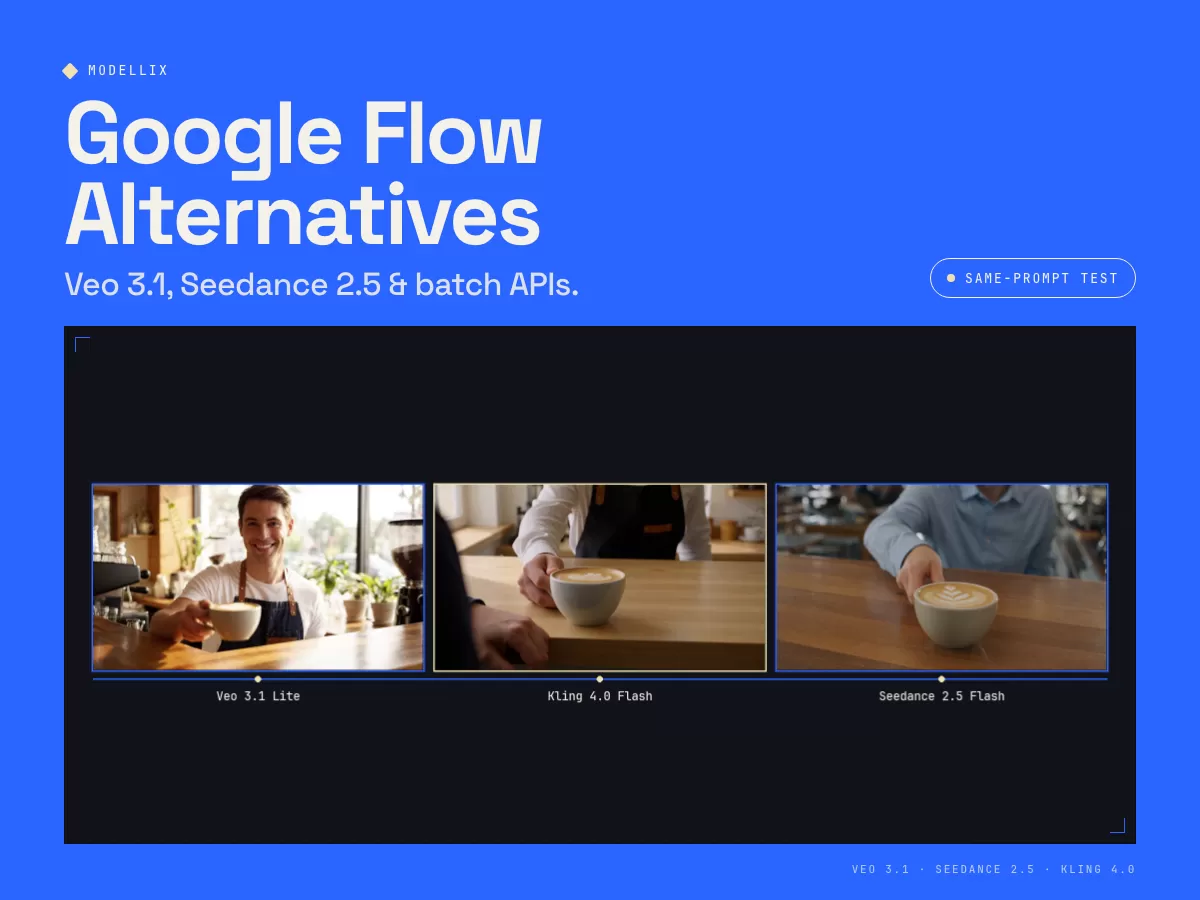
To measure real speed, resolution, and dialogue accuracy beyond marketing reels, we compared two separate cafe-prompt batches rather than one seven-clip test. On 19 November 2026 we billed three 6-second 720p clips (Veo 3.1 Lite, Seedance 2.5 Flash, and Kling 4.0 Flash) behind one API key for $1.674 total. The four 1080p clips below are reused from a 19 October 2026 benchmark of Veo 3.1 Standard, Veo 3.1 Fast, Seedance 2.5, and Kling V3; those billed amounts and gateway times belong only to that older resolution and model set. Here is how Google Flow credit subscriptions compare against unified multi-model APIs, direct Vertex AI, and standalone video studios.
Part 1: Google Flow alternatives compared by billing model and pipeline role
Pick your Flow replacement around whether you edit inside a browser UI or ship programmatic video jobs. Creative web studios replace Flow scene builders; pay-per-second APIs eliminate monthly credit expiration and multi-vendor lock-in.
| Workload | Start with | Billing unit & rate | Why it beats Google Flow subscriptions |
|---|---|---|---|
| Multi-model Veo, Seedance & Kling pipelines |  Modellix unified video API | $0.023 to $0.569 / sec (no subscription) | Run Veo 3.1, Seedance 2.5, Kling 4.0, and Gemini Omni 1.2 Flash from one pay-as-you-go balance without monthly credit expiration. |
| Cheap dialogue-ready drafts & fast iterations |  Veo 3.1 Lite / Fast | $0.045 to $0.270 / sec | Drafted our 6-second 720p cafe shot for $0.27 total in 40.37 s gateway latency before spending on 1080p finals. |
| Long continuous 4-to-30s storybeats |  Seedance 2.5 / Flash | $0.070 to $0.569 / sec | Generates up to 30 seconds in one clip with native audio and clean ComfyUI image-to-video frame chaining. |
| Ad motion & widescreen 21:9 framing |  Kling 4.0 / Flash | $0.084 to $0.420 / sec | Supports 3-to-30s shots across 21:9, 16:9, 9:16, and 1:1 with $0.504 720p tests on Kling 4.0 Flash. |
| Enterprise GCP IAM & VPC compliance |  Google Vertex AI Veo 3.1 | $0.05 to $0.60 / sec | Unlocks programmatic Veo 3.1 billing under corporate Google Cloud contracts when consumer Flow limits block automation. |
| Browser timeline & motion brushes |  Runway Gen-4.5 / Turbo | $0.05 (Turbo) / $0.12 (4.5) / sec | Pairs visual browser timeline controls with API access and camera choreography tools beyond Veo presets. |
| Pre-vis pitch decks & HDR lighting |  LTX Studio /  Luma Ray 3.2 | ~$0.03 to $0.36 / sec | Strong alternatives when visual artists want fast concept boards or cinematic HDR lighting without Flow seat friction. |
Scroll the table horizontally to see every column.
Run leading video models with one key, no code
Open the Modellix unified video Playground and run leading text-to-video models from one account, with no code required. Official docs confirm the browser Playground needs no code, and one API key covers Media Models plus the LLM gateway. Veo 3.1, Seedance 2.5, and Kling 4.0 are live routes you can open there today.
- Draft cheap on 720p Lite, finalize on 1080p or 4K: iterate prompts at $0.045/s on Veo 3.1 Lite before promoting approved camera beats to Veo 3.1, Seedance 2.5, or Kling 4.0.
- Zero expiring monthly seats: balances stay active indefinitely with auditable task receipts via console logs and REST endpoints.
- Longer single-shot headroom: exceed Veo's 8-second cap up to 15 seconds on Gemini Omni 1.2 Flash or 30 seconds on Seedance 2.5 and Kling 4.0.
- Agent and ComfyUI ready: install the Modellix Plugin in Claude Code, Codex, or Cursor, or chain ComfyUI image-to-video workflows, on the same API key.
Part 2: Google Flow credit plans vs Vertex AI and pay-per-second APIs
Google Flow bundles Veo into consumer subscription buckets, whereas production workflows bill cleanly per generated second. Knowing that split prevents teams from buying AI Ultra seats only to discover Flow credits cannot call an API.
Inside Google Flow (and Google AI subscription tiers), access revolves around non-rollover monthly credits: the Free tier offers 50 daily credits, Google AI Plus ($4.99/month) includes 200 monthly credits, Google AI Pro ($19.99/month) grants 1,000 monthly credits, and Google AI Ultra ($100 and $200 tiers, as named in Google Flow help) unlocks 10,000 to 25,000 monthly credits. Even at Ultra scale, unused credits vanish at month end, queue priority fluctuates during peak demand, and those credits never pay for programmatic Google Cloud Vertex AI Veo 3.1 calls.
When your studio moves into API execution, comparing Vertex AI Veo 3.1 rates ($0.05 to $0.60/second) against pay-per-second routes shows exactly where budget goes for a single 6-second take versus a 20-clip storyboard campaign (120 seconds total):
| Route / Plan | Listed unit price | One 6s clip | 20-clip run (120s) | Operational constraint |
|---|---|---|---|---|
| Veo 3.1 Lite (API route) | $0.045 to $0.072 / sec | $0.27 (720p live) | $5.40 (at 720p) | 4, 6, or 8s max clip duration; up to 1080p. |
| Kling 4.0 Flash (API route) | $0.084 to $0.1814 / sec | $0.50 (720p live) | $10.08 (at 720p) | 3 to 20s duration at 720p across 4 aspect ratios. |
| Veo 3.1 Fast (API route) | $0.090 to $0.270 / sec | $0.65 (1080p audio) | $12.96 (1080p audio) | Fastest 1080p dialogue delivery; supports 4K. |
| Seedance 2.5 Flash (API route) | $0.070 to $0.150 / sec | $0.90 (720p audio) | $18.00 (720p audio) | Supports up to 30s single-clip storytelling at 720p. |
| Veo 3.1 Standard (API route) | $0.360 to $0.540 / sec | $2.16 (1080p audio) | $43.20 (1080p audio) | Lower cost than Vertex list ($0.40 to $0.60/s). |
| Seedance 2.5 Full (1080p audio) | $0.103 to $0.569 / sec | $3.41 (1080p audio) | $68.28 (1080p audio) | Best reserved for final 1080p hero shots and long beats. |
| Google Flow UI Plans (Plus / Pro / Ultra) | US Plus / Pro / Ultra $100 or $200 tiers | Credit pool (no API) | Manual UI only | Credits expire monthly; cannot run headless batch scripts. |
Scroll the table horizontally to see every column.
Part 3: Same-prompt video comparison and top 8 Flow alternatives
To test dialogue fidelity, handheld depth of field, and cost per clip on identical creative input, we kept the same cafe barista prompt across seven live 6-second renders (four 1080p reference clips below plus three fresh 720p Flash and Lite runs):
The table below lists both cafe-prompt batches for convenience, but each row names its batch, date, resolution, and model. Rows 1, 2, and 5 are the 19 November 2026 720p Lite/Flash test. Rows 3, 4, 6, and 7 are the 19 October 2026 1080p reference batch (including Kling V3, not Kling 4.0).
| Tested endpoint | Resolution | Billed USD | Gateway latency | Verified output & pipeline takeaway |
|---|---|---|---|---|
| 1. google/veo-3.1-lite-t2v | 1280x720 (6.02s) | $0.2700 | 40.37 s | 1.71 MB MP4 with native sound. Billed $0.2700 in the 19 November 2026 720p Lite test. The $2.1600 Veo 3.1 Standard figure is from the 19 October 2026 1080p batch, so the two amounts are not a same-condition discount. |
| 2. kling/kling-4.0-flash-t2v | 1280x720 (6.04s) | $0.5040 | 71.95 s | 4.33 MB MP4 with audio; clean commercial motion under $0.09 per second. |
| 3. google/veo-3.1-fast-t2v | 1920x1080 (6.02s) | $0.6480 | 95.50 s | 6.10 MB 24 fps MP4; matched 1080p Veo 3.1 spoken line clarity at 70% lower cost. |
| 4. kling/kling-v3-t2v (19 Oct 2026, 1080p) | 1920x1080 (6.04s) | $0.8064 | 103.30 s | 10.00 MB 24 fps MP4; strong object contact stability and accurate cafe speech. |
| 5. bytedance/seedance-2.5-flash-t2v | 1280x720 (6.08s) | $0.9000 | 80.32 s | 7.87 MB MP4 with native sound; keeps Seedance 2.5's 30-second window at Flash speed. |
| 6. google/veo-3.1-t2v | 1920x1080 (6.02s) | $2.1600 | 95.40 s | 5.10 MB 24 fps MP4; flagship lighting control for final client deliverables. |
| 7. bytedance/seedance-2.5-t2v | 1920x1080 (6.08s) | $3.4140 | 294.00 s | 7.90 MB 24 fps MP4; filmic motion depth with native sound; reserve for approved finals. |
Scroll the table horizontally to see every column.
1. Modellix unified video API for one-key Veo, Seedance, and Kling routing
Pros
- One balance covers Google, ByteDance, and Kling so every storyboard uses the right model instead of forcing every clip into Veo.
- Lower Veo 3.1 rates than consumer Pro/Ultra guesswork with per-second receipts logged automatically per task ID.
Cons
- No built-in browser multi-track NLE canvas like Google Flow's Scene Builder; stitch or sequence approved MP4 shots in your editor or ComfyUI.
2. Google Veo 3.1 (Standard, Fast & Lite) for identical Veo quality without Flow throttling
Pros
- Same underlying Google video architecture that powers Flow, giving teams clean lip-sync and spoken dialogue on 1080p and 720p runs.
- Veo 3.1 Lite cuts test cost 8x ($0.27 vs $2.16 on a 6-second clip) so prompt rehearsal never touches flagship budget.
Cons
- Capped at 8 seconds per text-to-video generation (4, 6, or 8s string enums) with 16:9 and 9:16 ratios only.
3. Gemini Omni 1.2 Flash for 3-to-15-second narrative concepts
Pros
- Extends Google video clips up to 15 seconds at an accessible entry rate for product explainers and storyboards.
- Successor to earlier Gemini Omni Flash routes with deterministic seed support alongside 16:9 and 9:16 framing.
Cons
- Requires duration values passed as clean strings matching integers between 3 and 15 without trailing whitespace.
4. Seedance 2.5 & Seedance 2.5 Flash for 30-second multi-beat sequences
Pros
- Longest continuous clip window tested (4 to 30s) so multi-beat action sequences avoid harsh 8-second Flow cuts.
- Flexible ComfyUI image-to-video chaining lets directors lock character wardrobe across sequential frames.
Cons
- Seedance 2.5 1080p audio runs slowly and expensively (294 s gateway and $3.414 per 6s clip), so prototype on Seedance 2.5 Flash first.
5. Kling 4.0 & Kling 4.0 Flash for commercial product ads and 21:9 aspect ratios
Pros
- Wider cinematic aspect ratio selection (including 21:9 and 1:1) beyond Flow's standard landscape/portrait split.
- Strong value at $0.504 per 6s 720p test on Kling 4.0 Flash for fast commercial ad storyboarding.
Cons
- Kling 4.0 Flash tops out at 720p, requiring promotion to
kling/kling-4.0-t2vfor final 1080p campaign cuts.
6. Google Vertex AI Direct (veo-3.1) for enterprise GCP security and quotas
Pros
- Direct GCP project billing and VPC Service Controls satisfy strict enterprise legal teams already standardized on Vertex AI.
Cons
- Single-vendor catalog at higher list prices ($0.40 to $0.60/s Standard) without built-in access to Seedance 2.5 or Kling 4.0.
7. Runway Gen-4.5 & Gen-4 Turbo for browser timeline choreography
Pros
- Deep browser timeline editing and Act-One character controls give filmmakers hands-on UI pacing closest to Flow Scene Builder.
Cons
- Separate workspace and credit model if your script also triggers non-Runway models like Veo 3.1 or Kling 4.0.
8. LTX Studio & Luma Ray 3.2 for concept boards and HDR lighting
Pros
- Rapid storyboard pitching in LTX Studio and smooth HDR motion in Luma Ray 3.2 help creative directors explore framing fast.
Cons
- Weaker spoken-dialogue lip alignment than Veo 3.1 Fast or Standard when scenes rely on tight on-camera speech.
Part 4: How to produce multi-shot scenes fast via Agent, CLI, or ComfyUI
Replace Google Flow without building a video pipeline from scratch. Install the Modellix Plugin once in Claude Code, Codex, or Cursor, run a 720p comparison prompt, and promote only winning shots.
Step 1: Fund one prepaid balance. Open /console/login and top up once ($2 covers seven 6-second 720p Veo 3.1 Lite drafts).
Step 2: Connect your coding agent. Install the Modellix Plugin in Claude Code, Codex, or Cursor so the assistant reads live OpenAPI schemas automatically.
Step 3: Paste this prompt into your agent. Compare 720p takes on Veo 3.1 Lite and Kling 4.0 Flash with an upfront budget cap before scaling.
Step 4: Promote approved shots cleanly. Upgrade winning takes to google/veo-3.1-fast-t2v, bytedance/seedance-2.5-t2v, or kling/kling-4.0-t2v.
Pro tips: scale multi-shot workflows with official docs
Once your first camera angle passes review, keep spend capped inside Claude Code, Codex, or Cursor, or follow the Modellix API and CLI docs and our ComfyUI image-to-video guide for multi-shot pipelines.
Part 5: When to keep Google Flow vs when to move pipelines out
Consumer UI tools fit solo brainstorming; APIs win once team deadlines or code enter the loop.
- Stay on Flow Plus or Pro only for zero-setup personal tests: if a creator generates a handful of isolated clips inside Google's UI each month and never triggers automated pipelines, $4.99 to $19.99 remains simple.
- Move out as soon as unused credits expire or queues throttle: paying an Ultra $100 or $200 monthly tier while wasting unspent allowances costs far more than paying $0.045 to $0.27/s only when clips render.
- Pair Veo, Seedance, and Kling intentionally: use Seedance 2.5 for longer multi-beat camera travel, Kling 4.0 for stylized product ads, and multi-shot AI filmmaking workflows to stitch deliverables reliably. Always archive finished MP4 files within 7 days while reviewing
GET /api/v1/logsinside 30-day audit windows.
Frequently asked questions
1. What is the best overall alternative to Google Flow for API and multi-model control?
Routing Veo 3.1, Seedance 2.5, and Kling 4.0 through one pay-as-you-go gateway replaces Google Flow's single-vendor UI while eliminating expiring monthly credits. You keep identical Google Veo dialogue quality alongside longer 30-second Seedance and Kling options under one balance.
2. Can Google AI Pro or Ultra Flow credits pay for Google Cloud Vertex AI Veo 3.1 API calls?
No. Google Flow consumer credits stay locked inside the web tool and expire every month. Programmatic Vertex AI API billing requires Google Cloud Billing ($0.05 to $0.60/s depending on tier) or a third-party pay-per-second API key.
3. Which Google Flow alternative is cheapest for testing prompts and storyboards?
google/veo-3.1-lite-t2v at 720p billed just $0.2700 for a 6-second spoken-dialogue clip in our test (40.37 s gateway time), compared with $0.5040 on Kling 4.0 Flash and $0.6480 for 1080p audio on Veo 3.1 Fast.
4. Which model handles longer single-take shots better than Google Flow's 8-second limit?
Seedance 2.5 (up to 30s), Kling 4.0 (up to 30s), and Gemini Omni 1.2 Flash (3 to 15s) all generate longer single prompts without stitching multiple 8-second Veo segments manually.
5. Which alternative comes closest to Google Flow's visual browser timeline editor?
Runway (Gen-4.5 / Turbo) and LTX Studio provide dedicated web editors with camera timing, storyboard framing, and asset sequencing while also offering clear production upgrades outside Google's ecosystem.
6. How can teams prevent accidental overspending when migrating batches off Flow credits?
Draft on 720p Lite first and set a hard budget cap before running batches in Claude Code, Codex, or Cursor. Inspecting OpenAPI schemas via modellix-cli model get-schema is free, and each finished task logs exact USD charges per clip.