
Seedream API became harder to ignore: BytePlus lists 500 images per minute for its active Seedream image models, public per-image prices between $0.03 and $0.04, and native 4K output on Seedream 4.0 and 4.5. The competitive gap is practical, not cosmetic: teams that used to choose between readable poster text, reference consistency, and high resolution can now test those capabilities in one image model family. Which Seedream variant should you put behind a production image workflow today?
This guide separates verified API facts from launch-page positioning. It covers Seedream 5.0 Lite, Seedream 4.5, and Seedream 4.0, then explains image editing, multi-image fusion, async task handling, pricing, and the decision points that matter before you wire the model into a product.
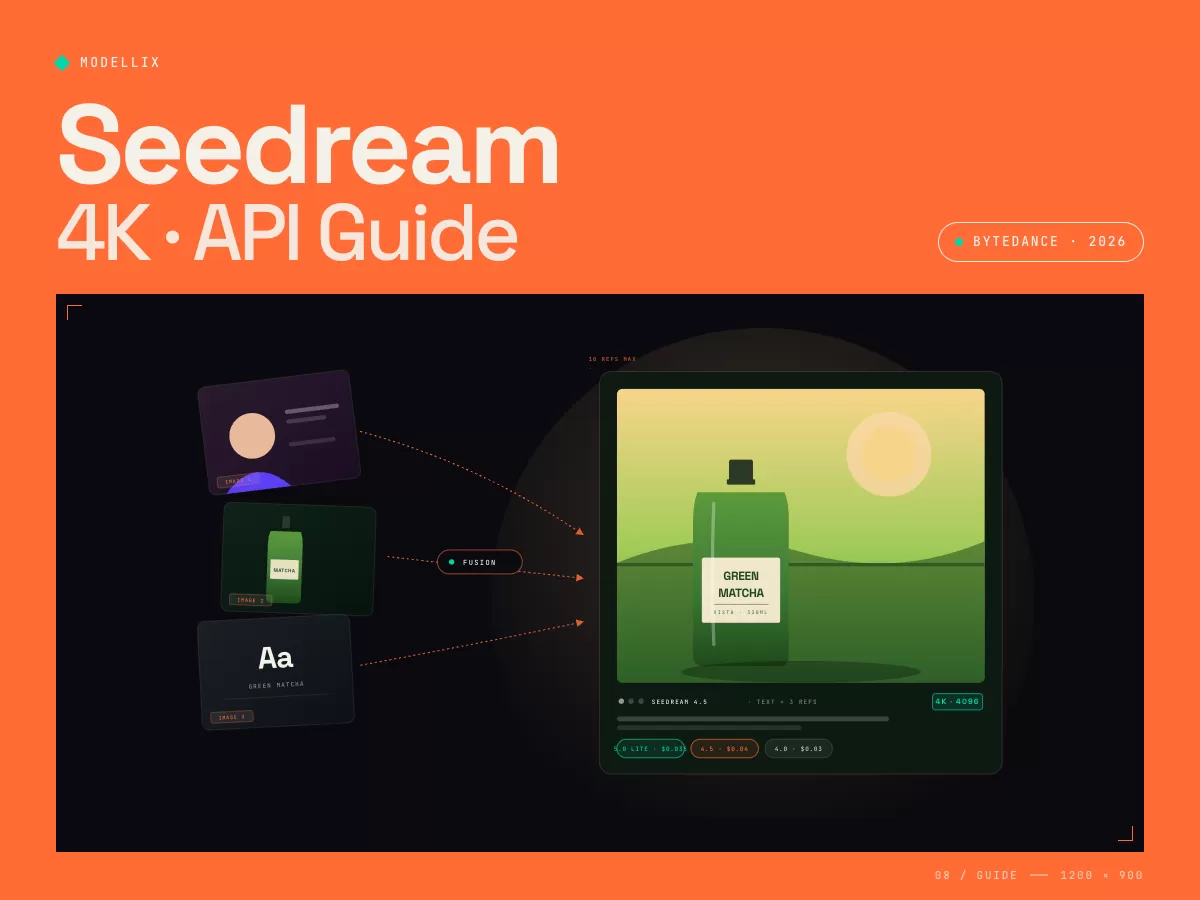
Seedream Capabilities Explained: 4K, Text, and Multi-Image Control
Seedream is ByteDance's image generation and editing model family inside BytePlus ModelArk. The current public ModelArk model list positions the family around four production capabilities: text-to-image generation, image-to-image editing, multi-reference composition, and batch or image-set generation.
The important shift is that these are not separate tools stitched together after the fact. Seedream 4.0 and 4.5 support text and image inputs inside the same image creation workflow, so a request can combine a prompt with one or more references, then generate a new asset, edit an existing one, or produce a coherent set.
For production teams, the useful capabilities are specific:
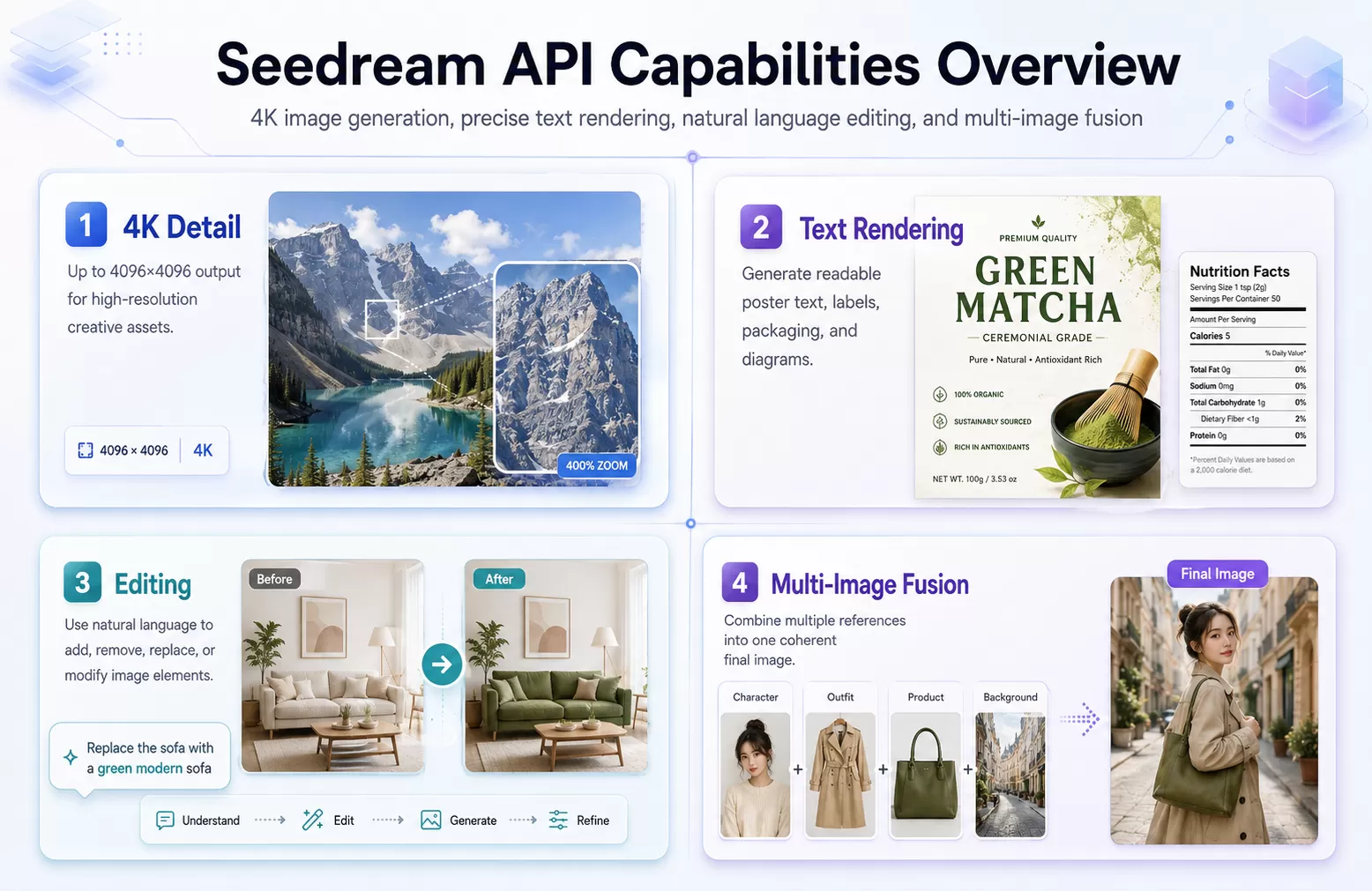
- 4K output. BytePlus documents Seedream 4.0 as supporting output resolution from 1K to 4K, including total output pixels up to 4096x4096. The Seedream product page also emphasizes 4K ultra high definition output for professional image creation.
- Precise text rendering. BytePlus positions Seedream as stronger than older image models at rendering text in posters, product labels, diagrams, and brand assets. This matters for marketing automation, localization, and UI mockups where unreadable text forces manual cleanup.
- Natural language editing. The Seedream 4.0 and 4.5 prompt guide describes editing operations such as addition, deletion, replacement, and modification through text prompts. Instead of drawing a mask for every edit, you can instruct the model to add jewelry, remove a hat, replace a product, or preserve a subject while changing the scene.
- Multi-image fusion. Seedream 4.0 supports multiple reference images, and the Seedream 4.5 product page describes combining text with up to 10 reference images. The practical use case is clear: preserve a character, product, outfit, background, or visual identity across a new generated asset.
- Image-set generation. Seedream can generate related image sets when the prompt asks for a series, set, storyboard, poster pack, or product design kit. This is useful for campaigns where one hero visual is not enough.
The strongest use cases are not generic "make a beautiful image" prompts. Seedream fits workflows where the output needs to obey constraints: exact words on a package, the same product in three angles, a character across multiple scenes, or a branded campaign that cannot drift between iterations.
3 Seedream Variants Compared: 5.0 Lite, 4.5, and 4.0
BytePlus currently lists Seedream 5.0 Lite, Seedream 4.5, and Seedream 4.0 in its image generation pricing table. The right choice depends on whether you value the newest model family, professional consistency, or established 4K throughput.
| Variant | Public model ID | Verified price | Best fit | Production note |
|---|---|---|---|---|
| Seedream 5.0 Lite | seedream-5-0-lite-260128 |
$0.035 per image | Newest Seedream family, text-to-image and image-to-image testing | BytePlus lists it in the current image generation pricing table and model list. Validate feature parity before replacing 4.5. |
| Seedream 4.5 | seedream-4-5-251128 |
$0.04 per image | Highest consistency, multi-image fusion, campaign assets, character or product series | BytePlus describes 4.5 as stable for multi-image fusion and exceptional editing consistency across images. |
| Seedream 4.0 | seedream-4-0-250828 |
$0.03 per image | Cost-aware 4K generation, batch ideation, social and content assets | BytePlus documents 1K to 4K output, 500 images per minute, and multi-reference image generation. |

Here is the decision logic:
Choose Seedream 4.5 for brand-critical outputs. If the image will be used in ads, e-commerce, packaging mockups, character IP, or product campaigns, the extra cent per image over 4.0 is usually a smaller cost than manual correction. The model's positioning is consistency first.
Choose Seedream 4.0 for high-volume 4K generation. At $0.03 per image in BytePlus pricing, 4.0 is the lowest listed price among the current 4.x and 5.0 Lite options. It is the practical default when you need many 4K candidates and can accept a little more review work.
Evaluate Seedream 5.0 Lite before standardizing on it. The model list shows the 5.0 family supporting text-to-image, image-to-image, multiple reference images, and batch generation. That makes it attractive, but production migration should be benchmark-driven: run the same prompts across 4.5 and 5.0 Lite before changing your default.
The lineup has moved since April. ByteDance has added Seedream 5.0 Pro, Edit, and Multi-Reference variants, and its image API reference now leads with 5.0 Pro (web-search grounding, layer decomposition). BytePlus still sells 4.0 and 4.5, but third-party catalogs have rotated:, Modellix lists only the Seedream 5.0 family (Lite, Lite Edit, Pro, Pro Edit, and Pro Multi-Reference), so the 4.x models are reachable through the official route below rather than through Modellix.
Calling Seedream Directly on BytePlus ModelArk
On the official route, image generation is a single synchronous request, not a task: POST {base}/images/generations returns the image URL in the response. Two regional base URLs are documented: https://ark.ap-southeast.bytepluses.com/api/v3 (ap-southeast-1) and https://ark.eu-west.bytepluses.com/api/v3 (eu-west-1, useful when data residency sits in Europe). As with other ByteDance models, the model must be activated in the console after the account is funded, or a valid key still fails.
curl https://ark.ap-southeast.bytepluses.com/api/v3/images/generations \
  -H "Authorization: Bearer $ARK_API_KEY" \
  -H "Content-Type: application/json" \
  -d '{
    "model": "seedream-4-0-250828",
    "prompt": "A miniature yurt village at night, warm orange light in the windows, deep blue sky",
    "size": "2K"
  }'
Parameters that matter for Seedream 4.0: size accepts 1K, 2K, 4K, or explicit pixels between 1280x720 and 4096x4096 (default 2048x2048), and the price is flat per image regardless of resolution. image takes one or more references as URLs or Base64 data URIs for editing and fusion. sequential_image_generation: "auto" returns a related batch in one call, with input references plus outputs capped at 15. response_format returns url or b64_json, and stream: true returns each image as it finishes.
Three details never show up in a happy-path test. Returned image URLs expire after 24 hours, so persist outputs when the response lands. A moderation-rejected image is skipped and not billed (usage.generated_images counts successes only); in batch mode the rest of the batch continues, while an internal 500 stops it. And the date suffix in seedream-4-0-250828 changes when ByteDance updates a model, so read the model ID from configuration. Seedream has no official open weights, so "Seedream on Hugging Face" results are re-uploads or wrappers.
API Request Lifecycle: 3 Steps to Submit, Poll, and Retrieve
This section is for developers who need Seedream image generation inside an application or automated asset pipeline. If you only need one image test, use Playground first; use the request lifecycle below once you need repeatable API calls.
Seedream image generation should be treated as an async media job, even when individual calls are fast. The same integration pattern used for video models works well for images: submit the job, poll for status, and retrieve the generated resource URL when the task finishes.
flowchart LR
    A["Submit image task"] --> B["Receive task_id"]
    B --> C["Poll task status"]
    C --> D{"Terminal state?"}
    D -->|"No"| C
    D -->|"Success"| E["Retrieve image URL"]
    D -->|"Blocked or failed"| F["Fix input or surface error"]

    classDef core fill:#eef2ff,stroke:#6366f1,color:#111827,stroke-width:1px;
    classDef success fill:#ecfdf5,stroke:#10b981,color:#111827,stroke-width:1px;
    classDef warn fill:#fff7ed,stroke:#f97316,color:#111827,stroke-width:1px;
    class A,B,C,D core;
    class E success;
    class F warn;
The official CLI documentation shows this async pattern. On Modellix, reference-driven requests go to bytedance/seedream-5.0-pro-multi-reference, which takes 2 to 10 reference images. A product reference request can be represented as a JSON body that includes the prompt, reference images, size, and output format:
export MODELLIX_API_KEY="YOUR_API_KEY"

modellix-cli model invoke \
  --model-slug bytedance/seedream-5.0-pro-multi-reference \
  --body '{
    "prompt": "Create a product poster for a bottled matcha drink. Preserve the bottle shape from the reference image, add the exact label text GREEN MATCHA, soft studio lighting, clean e-commerce composition.",
    "image": [
      "https://example.com/reference-bottle-front.jpg",
      "https://example.com/reference-brand-style.jpg"
    ],
    "size": "2048x2048",
    "output_format": "png"
  }'
A successful submit response returns a task ID and a result URL:
{
  "code": 0,
  "message": "success",
  "data": {
    "status": "pending",
    "task_id": "task-abc123",
    "model_id": "bytedance/seedream-5.0-pro-multi-reference",
    "get_result": {
      "method": "GET",
      "url": "https://api.modellix.ai/api/v1/tasks/task-abc123"
    }
  }
}
Poll until the task reaches a terminal state:
modellix-cli task get task-abc123
The result should include a generated image resource:
{
  "code": 0,
  "message": "success",
  "data": {
    "status": "success",
    "task_id": "task-abc123",
    "result": {
      "resources": [
        {
          "url": "https://cdn.example.com/images/abc123.png",
          "type": "image"
        }
      ]
    }
  }
}
For production code, add four safeguards around that loop:
- Store your own
request_idnext to the returnedtask_id. - Hash the prompt and reference URLs so repeated requests can be traced.
- Back off on rate-limit or temporary server errors.
- Treat policy blocks and invalid inputs as non-retryable until the input changes.
Seedream API Pricing Verified: Per-Image Costs and Failure Rules
Seedream pricing is per generated image, not per prompt token. BytePlus' current ModelArk pricing page lists the following image generation rates:
| Model | Price in BytePlus docs | Billing unit |
|---|---|---|
seedream-5-0-lite-260128 |
$0.035 | Per successfully generated image |
seedream-4-5-251128 |
$0.04 | Per successfully generated image |
seedream-4-0-250828 |
$0.03 | Per successfully generated image |
seedream-3-0-t2i-250415 |
$0.03 | Per successfully generated image |
seededit-3-0-i2i-250628 |
$0.03 | Per successfully generated image |
The failure rule is important for cost modeling. BytePlus states that charges apply only to successfully generated images, and images not generated due to moderation are not charged. That does not remove the need for input validation, but it changes how you model risk: the biggest cost driver is not a blocked prompt, it is a high discard rate on completed generations.
For a simple planning model, use this formula:
monthly image cost = successful images generated x model price
review cost = successful images generated x human review minutes x hourly rate
true campaign cost = monthly image cost + review cost + post-processing cost
The cheapest model is not always the cheapest workflow. If Seedream 4.5 reduces retakes for product identity, character consistency, or readable text, it can beat 4.0 on total production cost even though the listed image price is higher.
Multi-Image Fusion Verified: Character and Product Consistency
Multi-image fusion is the Seedream capability most likely to change a real content pipeline. A single prompt can reference a face, an outfit, a product, a logo style, and a background, then ask the model to combine the relevant elements into one coherent output.
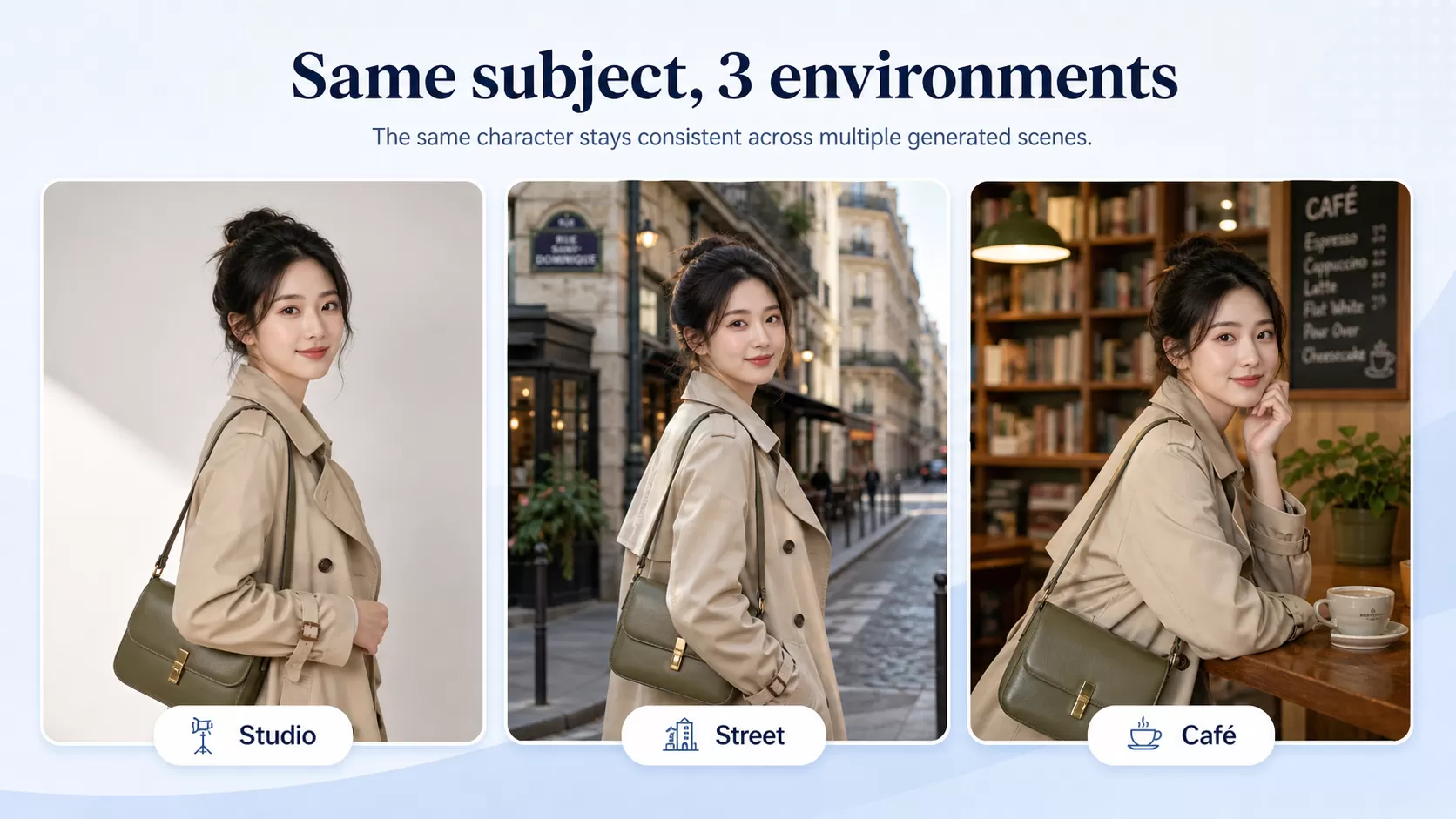
The best prompts name what each reference contributes. Avoid vague prompts like "use these images as reference." Use explicit roles:
Use Image 1 as the character identity reference.
Use Image 2 as the outfit reference.
Use Image 3 as the background lighting reference.
Generate a 4K cinematic poster with the same character, same outfit material, and the label text VISTA LABS clearly readable on the badge.
For product workflows, the same pattern applies:
Use Image 1 for the bottle shape.
Use Image 2 for the label typography.
Use Image 3 for the campaign color palette.
Generate three product ad concepts on a white studio background. Keep the bottle geometry and label text unchanged.
This structure makes the request auditable. If the output fails, you can diagnose whether the model missed identity, style, text, or composition instead of arguing with a single overloaded prompt.
Unified Access Explained: One Key for ByteDance Image and Video Models
Direct BytePlus access gives you official ModelArk control, but it also means managing model activation, regional availability, API keys, billing, rate limits, and provider-specific response formats. That is fine if your stack only calls one vendor. It becomes expensive when your product needs Seedream for images, Seedance for video, Kling for alternate video generation, and another model for editing or audio.
Modellix reduces that integration surface by putting major media models behind one API key, one billing dashboard, and the same async task pattern. The benefit is not that every model behaves identically. The benefit is that your product code can treat generation as a provider-routed task, then switch model slugs as quality, cost, or availability changes.

One endpoint strategy: use Seedream for production image generation, Seedance for ByteDance video generation, and the same task polling logic for both. That keeps your retry, logging, usage tracking, and billing checks in one place.
Production Checklist: 6 Decisions Before You Ship Seedream
Before putting Seedream behind a user-facing product, decide these six items:
- Default variant. Use 4.5 for consistency-sensitive work, 4.0 for lower-cost 4K volume, and 5.0 Lite for controlled evaluation until your benchmark proves it should be default.
- Reference image rules. Define accepted file types, max size, max reference count, and whether users can mix people, products, logos, and backgrounds in one request.
- Text rendering review. If the output contains labels, posters, UI text, or Chinese and English typography, add OCR or human review before publishing.
- Retry policy. Retry temporary server errors, but do not retry blocked or invalid inputs without changing the request.
- Cost logging. Log model ID, task ID, prompt hash, reference count, output count, and final status for every request.
- Fallback plan. Keep at least one alternate image model available for outages, rate limits, or prompt classes where another model performs better.
The teams that get the most value from Seedream will not be the ones that generate the most images. They will be the teams that define what a good output means, measure retake rate by model, and route each job to the cheapest variant that meets the quality bar.

Modellix collection
Compare Text-to-Image Models in One Playground
Test the same production prompt across leading image models before choosing a workflow to automate.
Good first tests: Seedream 5.0 Pro GPT Image 2 Nano Banana 2 Lite
Explore the collectionHow to Test Seedream in 30 Seconds
Every method starts with a Modellix account. Sign in with email, Google, or GitHub, add credit, and pay only for what you generate. There is no subscription.
Create your Modellix account →
Method 1: Playground
No code. Open the Seedream 5.0 Pro model page, paste a prompt, and review the result in your browser.

Method 2: API, Through Your Coding Agent
Paste this into Claude Code, Codex, or Cursor. One sentence and one API key are all your agent needs: change the model name and docs link, and the same prompt batch-generates assets with any model on Modellix.
My Modellix API key is mdlx-••••••••••••••••••••••••. Read https://docs.modellix.ai/get-started/index.md and https://docs.modellix.ai/bytedance/seedream-5-0-pro.md, then use Seedream 5.0 Pro to generate one image for each prompt in prompts.txt. Poll each task until it finishes and save the images to ./images.
Swap the masked key for your own from the Modellix console. Treat it like a password and share it only with agents you trust. The API guide covers the raw request format.
Method 3: Skill
Install the Modellix skill once. After that, your agent finds the right model and request fields by itself.
npx skills add https://github.com/Modellix/modellix-plugin --skill modellix
Use the Modellix skill to generate an image with Seedream 5.0 Pro, then download it to ./images.
Setup for each agent host is in the Skill guide.
Method 4: CLI
For scripts and scheduled jobs. One command submits the task, waits, and prints the result URL.
npm install --global modellix-cli
export MODELLIX_API_KEY="your_api_key"

modellix-cli model run --model-slug bytedance/seedream-5.0-pro \
  --body '{"prompt":"A premium product photo of an amber serum bottle on wet black stone, golden rim light"}' \
  --wait --timeout 15m --quiet
For batches, put one request per line in a JSONL file and run modellix-cli model batch. See the CLI guide.
Frequently Asked Questions About Seedream API (April 2026)
Does Seedream support 4K image generation?
Yes. BytePlus documents Seedream 4.0 with output resolution from 1K to 4K, and the Seedream 4.5 product page emphasizes 4K ultra high definition output. For production, confirm the exact size values supported by the endpoint you call.
How much does Seedream API cost?
BytePlus lists Seedream 5.0 Lite at $0.035 per image, Seedream 4.5 at $0.04 per image, and Seedream 4.0 at $0.03 per image. These are public ModelArk reference prices, and final purchasable terms can vary by account or provider.
Can Seedream edit existing images?
Yes. Seedream 4.0 and 4.5 support image-to-image editing through natural language instructions. The prompt guide covers addition, deletion, replacement, modification, reference-based generation, style transfer, and multi-image input workflows.
How many reference images can Seedream use?
Seedream 4.0 supports multiple reference images, and the Seedream 4.5 product page describes multi-reference support with up to 10 reference images. For complex workflows, count both input references and requested outputs because image-set generation can have total-count limits.
How does Seedream compare to Midjourney for production teams?
Midjourney is strong for creative exploration and art direction. Seedream is better suited to API-first production pipelines where developers need model IDs, predictable billing, reference-image control, task status tracking, and repeatable integration behavior.
Can I access Seedream and Seedance through one workflow?
Yes. Modellix exposes ByteDance image and video generation models through a unified API workflow, so teams can call Seedream for image generation and Seedance for video generation without building separate provider logic for every model family.
Sources checked for this draft include BytePlus ModelArk pricing, BytePlus ModelArk model list, the Seedream 4.0 model page, the Seedream 4.0 and 4.5 prompt guide, the BytePlus Seedream product page, and the official CLI documentation.
Build with the latest AI models
Explore image, video and audio models through one API.
Start buildingRelated articles

Seedream 5.0 API: Integration Guide, Pricing & Code
Seedream 5.0 API guide, September 2026: official BytePlus pricing from $0.035 per image, Lite and Pro model IDs, the endpoint, working code, and route fit.
Seedream 4.5 API: Integration Guide, Pricing & Code
Seedream 4.5 API pricing: official BytePlus at $0.04/image, aggregator routes with no activation, model IDs, error handling, and working code.
GPT Image 2 API: Pricing, All 4 OpenAI Image Models, and Production Setup (2026)
GPT Image 2 API is live. See pricing for all 4 OpenAI image models, token math, multi-turn editing, 4K output, and production integration with Modellix.
Seedance 2.0 API Guide: Pricing and Global Access (2026)
Complete Seedance 2.0 API guide: I2V, V2V, Fast variants explained, pricing tiers, BytePlus vs Volcano Engine access, async job lifecycle, and how to integrate via Modellix.