OpenAI shipped GPT Image 2 on April 21, 2026, and opened the API in early May. The model claims roughly 99 percent character-level accuracy across Latin, CJK, Hindi, and Bengali scripts. It runs about 2x faster than GPT Image 1.5 and supports up to 4K (3,840 by 2,160). On the Artificial Analysis Image Arena, it scored 1,512 Elo against Nano Banana Pro’s 1,271, a 241-point lead.
The bigger question for builders is no longer whether the model is good. It is which of the four OpenAI image endpoints to use, and what each one costs at production scale.
This guide covers all four OpenAI image endpoints currently available through the Modellix unified API (gpt-image-2, gpt-image-2-edit, gpt-image-1.5, and gpt-image-1.5-edit) with pricing, parameters, and integration patterns confirmed as of May 14, 2026. Every price quoted comes from OpenAI’s official token-based rate card and the per-image translation Modellix passes through, with benchmark data sourced from the model’s official release notes and the Artificial Analysis Image Arena.
The practical question this article answers: which OpenAI image model should you call in production today, and what does it cost per 1,000 images at the quality level you actually need?
What’s new in GPT Image 2: 4 capability shifts builders care about
The jump from GPT Image 1.5 to GPT Image 2 is not a typical version bump. According to OpenAI’s April 21, 2026 announcement, four things changed in ways that affect how teams should think about the API.
1. Thinking mode joins the image stack. GPT Image 2 is the first OpenAI image model to apply O-series reasoning before generation. It plans the composition (where the text goes, what the lighting should be, how elements relate) before producing pixels. OpenAI describes this as the industry’s first agentic image model. In practical terms, prompt adherence improves on layouts that previously required two or three regeneration passes.
2. Text rendering near 99 percent. OpenAI reports approximately 99 percent character-level accuracy across Latin, CJK, Hindi, and Bengali scripts. For comparison, Nano Banana 2 can still produce gibberish or scribble-like text in dense multi-element compositions. If your output ships into ad creatives, posters, or product banners that contain readable copy, this is the single largest reason to call GPT Image 2 over alternatives.
3. 4K resolution and 2x speed. The model supports outputs up to 3,840 by 2,160 (true 4K). OpenAI states generation is approximately 2x faster than GPT Image 1.5. End-to-end latency on a high-quality request lands near 3 seconds in OpenAI’s reported testing.
4. Multi-turn context-aware editing. The companion endpoint gpt-image-2-edit accepts one or more reference images plus a natural-language instruction. It preserves the unchanged regions while applying targeted edits. This is the workflow shift that matters most for production teams: you no longer regenerate from scratch for every variant.
The 4 OpenAI image endpoints on Modellix: when to call which
OpenAI ships four production image endpoints. All four are available through one Modellix integration. You change the model_id parameter, not your architecture.
| Endpoint | Best use case | Max resolution | Edit input | Price range (per image, as of May 2026) |
|---|---|---|---|---|
gpt-image-1.5 |
Fast drafts, social posts, bulk variant exploration | 1,024 x 1,024 | No | $0.009 to $0.133 |
gpt-image-1.5-edit |
Low-cost edits to existing images | 1,024 x 1,024 | Yes | $0.030 to $0.090 |
gpt-image-2 |
Production hero images, anything with readable text, 4K output | 3,840 x 2,160 | No | $0.006 to $0.480 |
gpt-image-2-edit |
Multi-turn iteration on a reference image, A/B variants | 3,840 x 2,160 | Yes | $0.030 to $0.660 |
Choosing between the two generations. If your workload tolerates 1,024 x 1,024 output and does not depend on text rendering, GPT Image 1.5 remains the cheaper option per image. According to OpenAI’s December 16, 2025 release notes, GPT Image 1.5 introduced a 20 percent price reduction over GPT Image 1 and matched Imagen 4 Standard’s price while leading it on quality benchmarks. For teams already in production on 1.5, there is no forced migration. For new builds that need text, 4K, or multi-turn editing, start on GPT Image 2.
Choosing between text-to-image and edit. Use the base endpoint (gpt-image-2) when generating from scratch. Use the edit endpoint (gpt-image-2-edit) when iterating on an existing asset. The edit endpoint accepts up to several reference images and a prompt describing the change. It returns a new image that preserves the parts you did not ask to modify. This is significantly different from the regenerate-and-pray pattern most diffusion APIs default to.
GPT Image 2 API pricing: token math vs per-image cost (verified)
OpenAI prices GPT Image 2 on a token basis. The Modellix model detail pages express the same cost per image, which is what most teams actually need to budget.
OpenAI token-based rate card (as of May 2026):
| Token type | Standard rate (per 1M tokens) | Batch API rate (per 1M tokens) |
|---|---|---|
| Image input | $8.00 | $4.00 |
| Cached image input | $2.00 | $1.00 |
| Image output | $30.00 | $15.00 |
| Text input | $5.00 | $2.50 |
| Cached text input | $1.25 | $0.625 |
Per-image translation (as of May 2026, per Modellix model detail pages):
| Quality | 1k output | 2k output | 4k output |
|---|---|---|---|
| Low | $0.006 | $0.024 | $0.096 |
| Medium | $0.053 | $0.120 | $0.240 |
| High | $0.130 | $0.260 | $0.480 |
Three notes on the math.
First, low quality is the default and is suitable for fast drafts. Medium is the sweet spot for most thumbnails and social assets. High is what you call when the asset ships to production.
Second, OpenAI’s Batch API cuts every token category by 50 percent in exchange for asynchronous processing. If you have nightly catalog generation, ad variant pipelines, or any workload where same-second response is not required, batch routing pays for itself quickly. Per the published rate card, the math is straightforward: 1,000 medium-quality 1k images cost $53 standard, $26.50 batch.
Third, multi-turn edits through gpt-image-2-edit include the input image as token cost. A long editing chain on a 4k reference image will charge meaningfully more than a fresh generation. Plan your asset pipeline to upload once at the lowest resolution that satisfies your edit needs.
Modellix collection
Compare Text-to-Image Models in One Playground
Test the same production prompt across leading image models before choosing a workflow to automate.
Good first tests: Seedream 5.0 ProGPT Image 2Nano Banana 2 Lite
Explore the collectionHow to Test GPT Image 2 Before API Integration
Most readers should not start with code. Use the Modellix Playground to run one real GPT Image 2 job first, then move to API, Skill, or CLI only after the prompt, settings, cost, and output format are worth repeating. This keeps the guide useful for creators, product teams, and technical buyers, while developers still get a clean implementation path.
Quick start guide
Choose the right entry point for GPT Image 2
Playground: Best for most readers and first-time tests. Open the GPT Image 2 model page and test a prompt that includes the real text, layout, or product constraints you care about: https://www.modellix.ai/models/openai/gpt-image-2.
API docs: Use this when a developer is ready to turn the validated prompt into a backend, batch, or product workflow. Start with the API path for repeatable OpenAI image generation and editing: https://docs.modellix.ai/ways-to-use/api.
Skill: Use the Modellix Skill when an AI agent should create media from your workspace without hand-writing every request: https://docs.modellix.ai/ways-to-use/skill.
CLI: Use the CLI for repeatable terminal commands, local scripts, or scheduled generation jobs: https://docs.modellix.ai/ways-to-use/cli.
The links above are the routing layer. The walkthrough below is the practical path for the main audience: create an account, use the included credit, run one Playground job, and only then decide whether an API key is necessary.
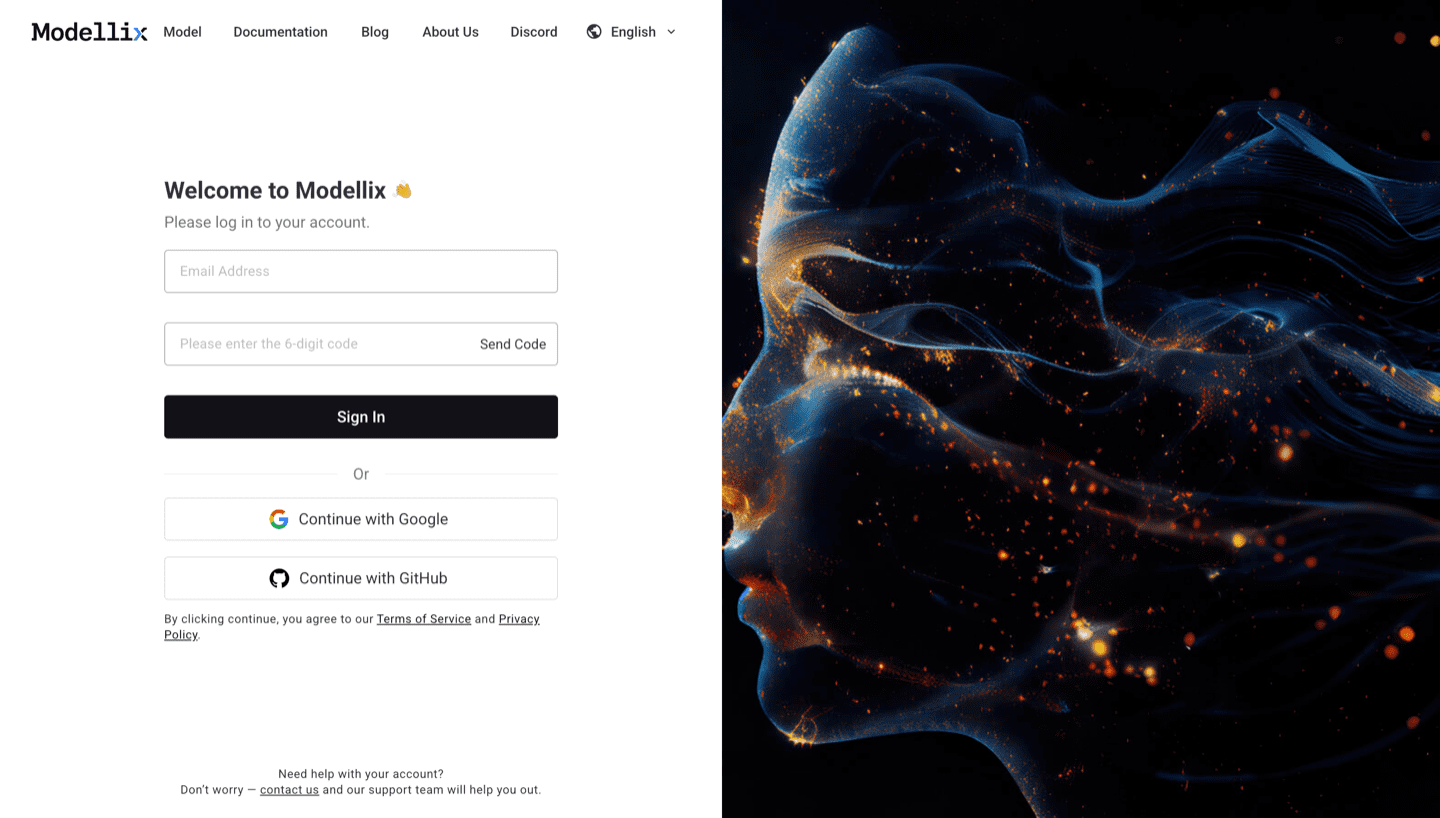
Step 1: Create or Sign In and Use the Included $1 Credit
Create or sign in to a Modellix account before you test GPT Image 2 and OpenAI image models. New users can use the included $1 credit to validate model behavior, prompt quality, output download, and request logging without committing to a full integration.
Step 2: Open the Model Page and Run One Prompt
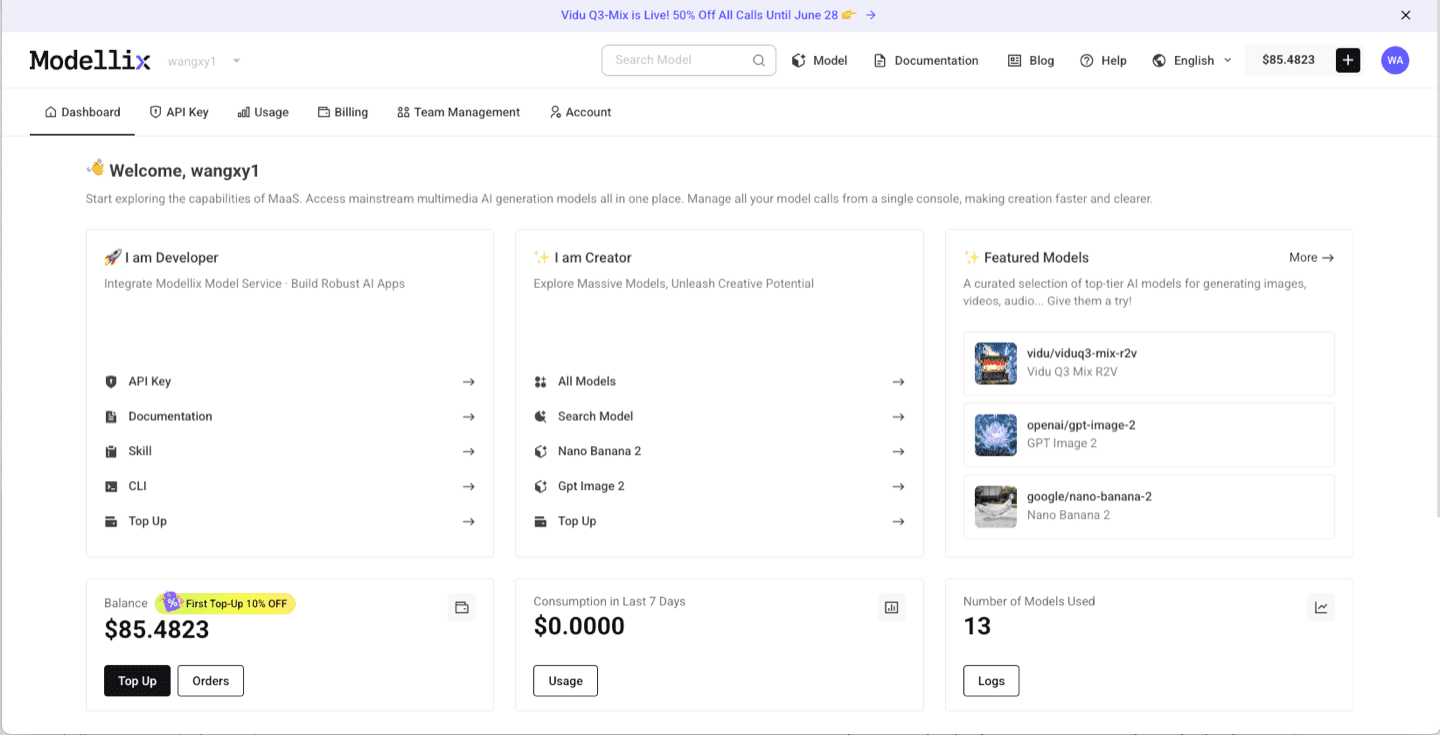
After login, use the dashboard shortcuts or the Modellix model catalog to open GPT Image 2 model page. For image models, check prompt clarity, output size, reference images, text rendering, and whether the result is good enough to download or edit again. This step is the fastest way to learn whether the model fits before you read more code.
Step 3: Optimize the Prompt and Review the Output
Before you automate anything, improve the prompt and inspect one real output. The example below uses Vidu Q3 Mix R2V, but the same Playground pattern applies across Modellix model pages: write the prompt, use prompt enhancement when the brief is too thin, run the job, and review the generated media before creating an API workflow.

After the run finishes, check whether the result matches the prompt, motion, framing, and output format you need. A real preview is the conversion point: if the result works, move to API key, Skill, or CLI; if it does not, iterate in Playground before spending engineering time.

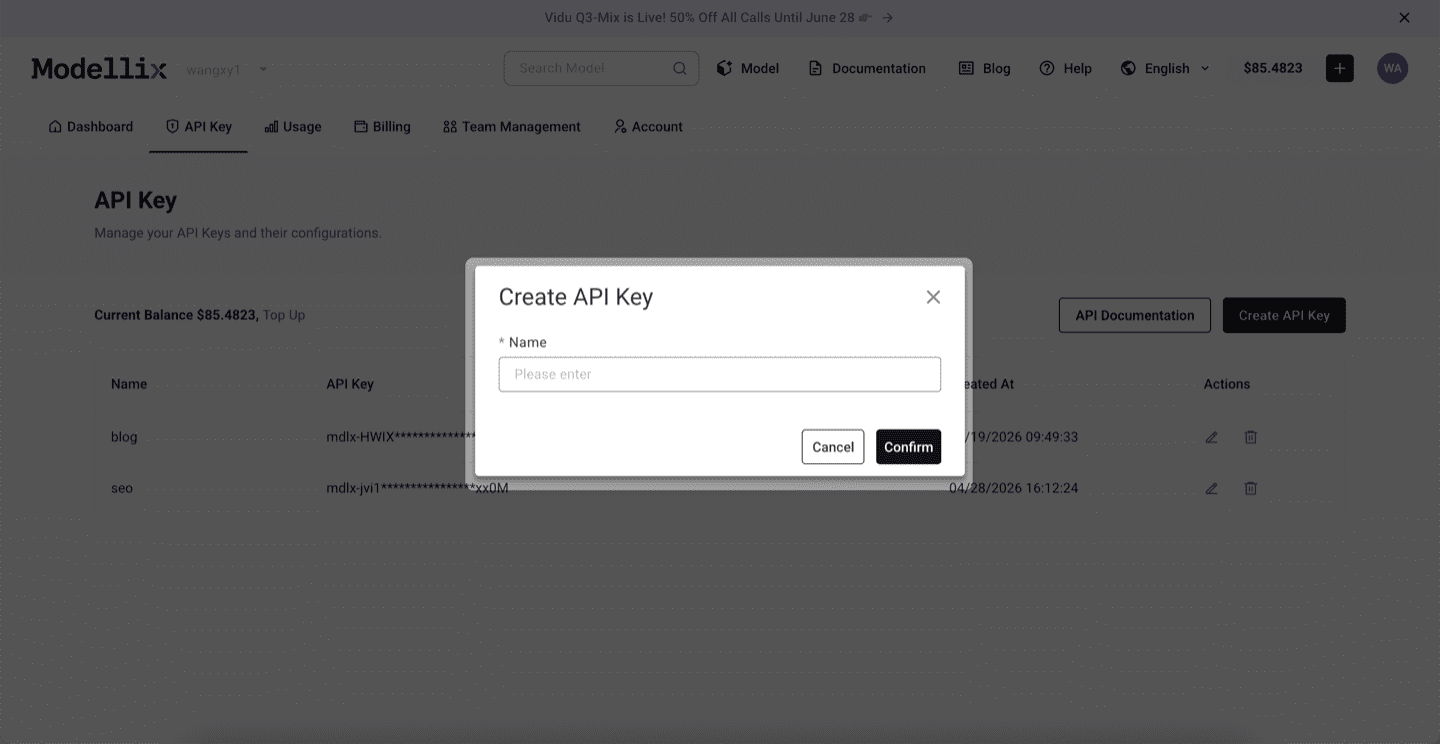
Step 4: Create an API Key Only When the Test Needs to Repeat
Stay in Playground for one-off exploration. Create an API key when a backend service, agent, batch script, or CLI workflow needs to repeat the same prompt pattern. This keeps the mainstream testing flow simple while giving developers a clean handoff point.
Step 5: Check Logs and Save the Result Before Scaling
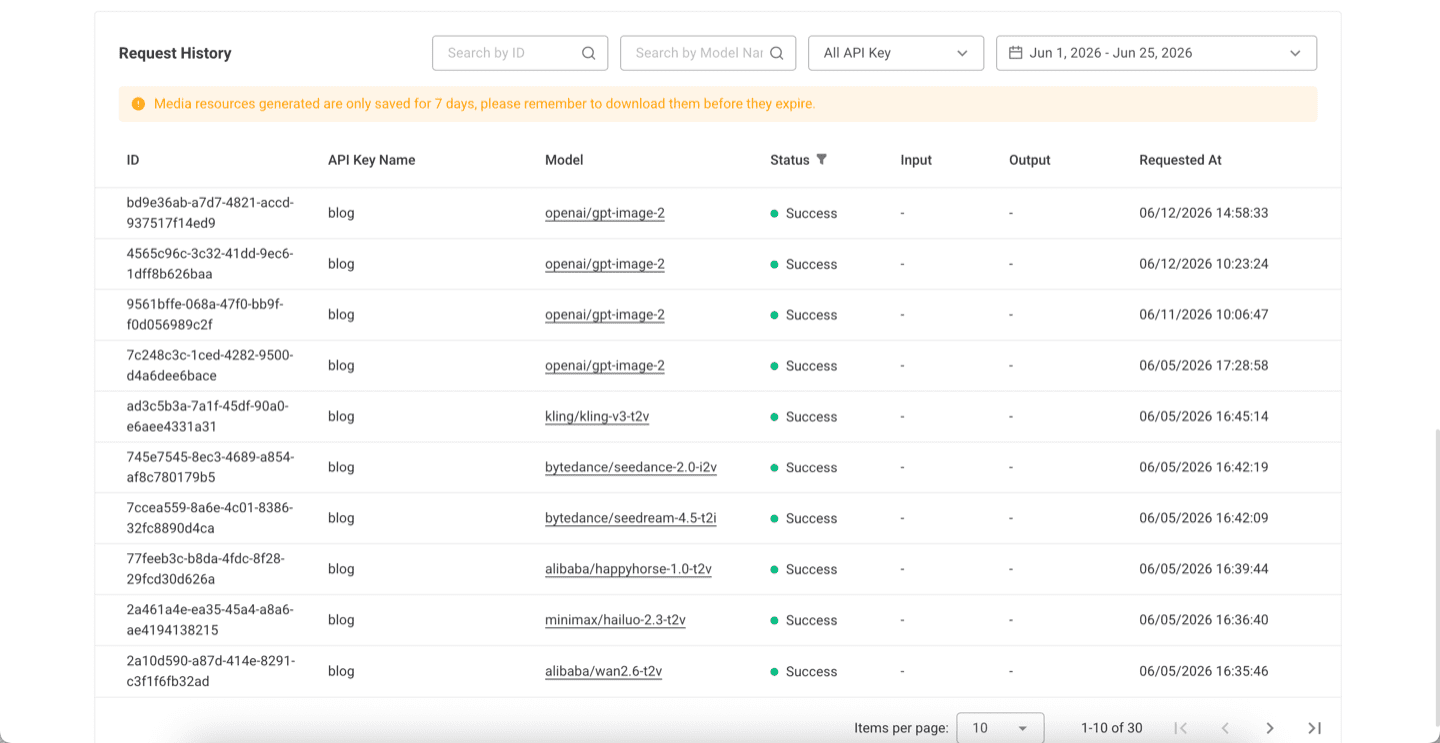
Before scaling from one manual run to repeated API, Skill, or CLI usage, review request history. Logs confirm the model slug, API key name, task status, request time, and result retention window, which makes the workflow easier to debug after it leaves Playground.
Try GPT Image 2 Next
The practical next step is to run one real job from the official site, not to copy a complex code sample too early. Start from the Modellix console, open the GPT Image 2 model page, and move to API, Skill, or CLI only after the output is good enough to repeat.
Test GPT Image 2 before wiring production code
Open the official GPT Image 2 model page, use the free credit, and verify prompt quality, text rendering, output size, and request logs before you automate image generation.
GPT Image 2 API quick start: a 20-line curl walkthrough
Calling gpt-image-2 through the Modellix unified API requires one POST request. The example below generates a 1024 x 1024 image at medium quality.
1 | curl -X POST https://api.modellix.ai/v1/openai/gpt-image-2 \ |
Required parameters:
prompt(string, up to 32,000 characters). The text description of the image you want.quality(string, optional). One oflow,medium,high. Defaults tolow.size(string, optional). Output dimensions. Defaults to 1024 x 1024. Use1024x1024,2560x1440, or3840x2160for 1k, 2k, and 4k respectively.user(string, optional but recommended). A stable identifier for the end user calling the model. Used by OpenAI for abuse monitoring and by Modellix for usage analytics.
The response returns a JSON payload with a signed URL pointing to the rendered image. Cache the URL or download the asset within the TTL window.
Python users can mirror the same call with the standard SDK:
1 | import os, requests |
GPT Image 2 does not support transparent backgrounds (as of May 2026). If your pipeline needs alpha channel output, route those assets to gpt-image-1.5-edit or a different model entirely.
Multi-turn editing with gpt-image-2-edit: 3 production patterns
The gpt-image-2-edit endpoint is the part of the release that affects pipeline design most. Three patterns capture the bulk of real production use.
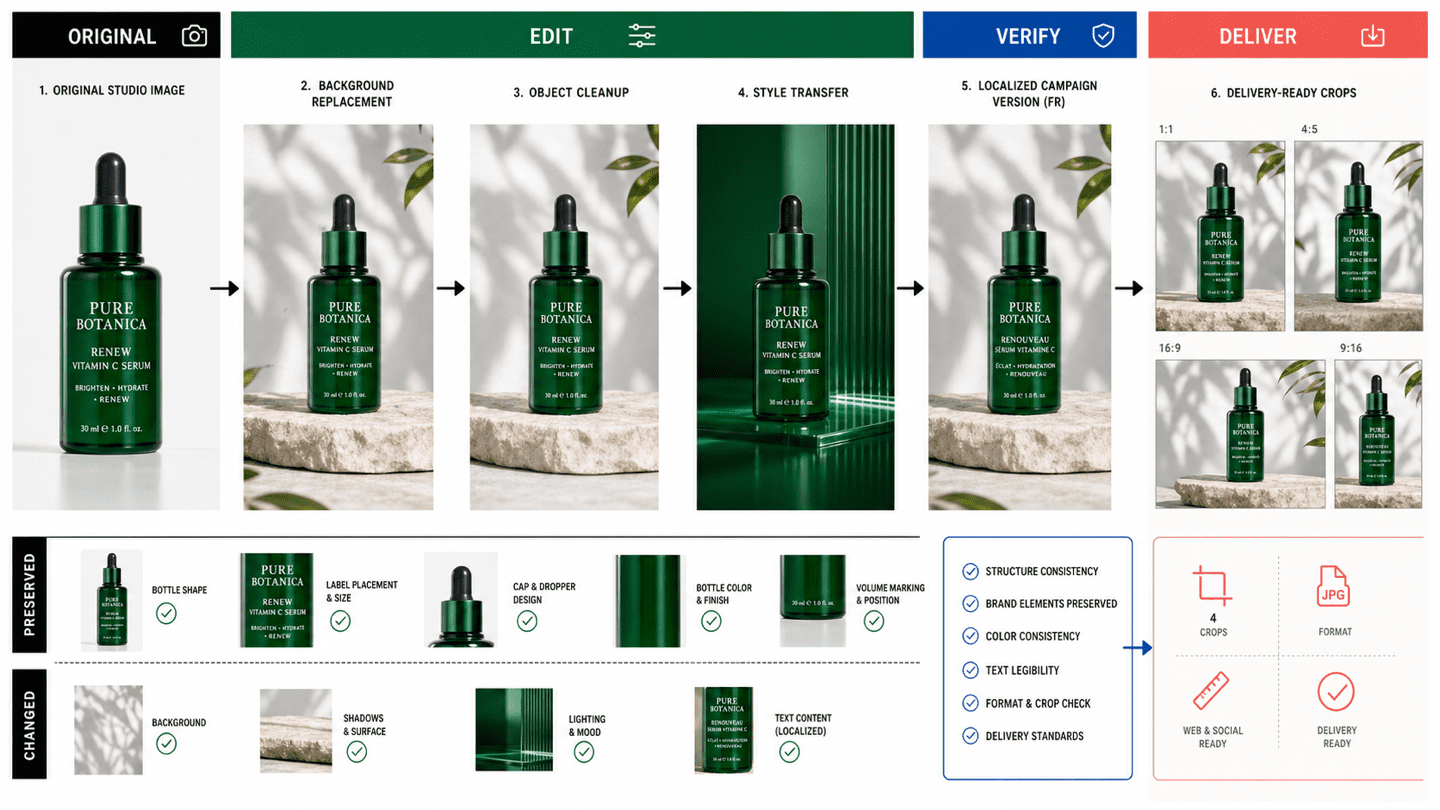
Pattern 1: Hero image iteration. Generate one master image at 4k high quality. Send it as the reference image to gpt-image-2-edit for downstream variants. Each edit costs less than a fresh 4k generation, and the unchanged regions (face, product, background composition) stay consistent.
1 | resp = requests.post( |
Pattern 2: Product catalog variants. Maintain a single source-of-truth image per SKU. Use the edit endpoint to produce color, angle, or context variants without retraining or restyling from scratch. According to OpenAI’s release notes, the model preserves identity (product shape, label placement, lighting consistency) across edits. This replaces the previous workflow of training a per-SKU embedding or running a separate masking pipeline.
Pattern 3: A/B test creative. Send the same reference image with different edit prompts to generate copy or style variants. Run the variants through your usual A/B framework. Multi-turn editing is significantly faster than regenerating from text alone, and the resulting variants share enough visual DNA to make A/B signal cleaner.
A note on aspect ratios. The edit endpoint auto-detects aspect ratio from the input image if you do not specify one. Pass aspect_ratio explicitly when the output needs to differ from the source (for example, social square crop from a landscape hero).
When GPT Image 2 is the right call (and when it is not)
Not every image workload should route to GPT Image 2. The following decision table reflects the model’s strengths and weaknesses as of May 2026.
| Workload | GPT Image 2 fit | Better option (if any) |
|---|---|---|
| Ad creatives with readable text | Strong | None close, GPT Image 2 leads on text |
| Product banners with brand copy | Strong | None close |
| UI mockups and dashboard layouts | Strong | None close, world knowledge is solid |
| Multi-turn iteration on a hero image | Strong | None, this is the killer pattern |
| Photorealistic portraits, cinematic skin | Weaker | Nano Banana Pro Edit for portrait realism |
| Outputs needing transparent backgrounds | Not supported | Stable Diffusion 3.5, Recraft V3 |
| Pure artistic / illustrative output | Mixed | Midjourney v7 still leads on artistic feel |
| Bulk low-quality drafts at $0.01 per image | Acceptable | Imagen 4 Fast or Z-Image Turbo for thrift |
The strongest claim to make about GPT Image 2 is that it now produces commercially usable output on the first attempt for jobs that previously required two or three regenerations. For ads, banners, posters, and any composition with text, this changes the unit economics meaningfully.
The honest counterclaim is that GPT Image 2 is not the cheapest. If your workload is bulk volume at low quality (catalog enrichment, thumbnail generation, background variants in the hundreds of thousands), the per-image math favors lighter models such as Imagen 4 Fast, Wan 2.2 T2I, or Z-Image Turbo.
Production considerations: rate limits, latency, and logging
Three operational notes for teams moving GPT Image 2 from prototype to production.
Rate limits. OpenAI tier-based rate limits apply at the underlying model. Modellix routes traffic transparently, which means your Modellix account tier determines the effective ceiling. Check the Modellix console for current per-model RPM and TPM caps. As of May 2026, Tier 1 accounts see a 4 to 6 second cold start on the first request, then warm latency around 3 seconds for medium quality 1k outputs.
Latency expectations. End-to-end latency at standard rate is approximately 3 seconds for medium quality 1k outputs and 6 to 9 seconds for high quality 4k outputs. The thinking mode adds 1 to 2 seconds upfront on complex prompts. If your front-end UX requires sub-second response, do not block on synchronous calls; use the Modellix webhook callback pattern or the Batch API for asynchronous workloads.
Logging and cost transparency. Modellix exposes per-image token cost and quality breakdown in the console billing logs. This matters because GPT Image 2 token math compounds quickly across multi-turn edit chains. Reviewing per-call cost weekly catches runaway prompt expansion before it shows up on the invoice. The parent company JG Group is NASDAQ-listed, which gives some teams the audit trail and compliance posture they need when running OpenAI workloads in regulated industries.
Frequently asked questions about GPT Image 2 API (May 2026)
Q1: Is GPT Image 2 available through an API today?
Yes. OpenAI opened the gpt-image-2 API in early May 2026, following the ChatGPT product launch on April 21. Modellix routes the model through its unified API at https://api.modellix.ai/v1/openai/gpt-image-2. Both the base text-to-image endpoint and the gpt-image-2-edit companion are live as of May 14, 2026.
Q2: How much does GPT Image 2 cost per image at each quality level?
As of May 2026, OpenAI’s token-based pricing translates to approximately $0.006 per image at low quality (1k), $0.053 at medium (1k), and $0.130 at high (1k). At 4k, those numbers scale to $0.096, $0.240, and $0.480 respectively. Modellix passes the same per-image cost through with no per-call markup; volume discounts apply at higher tiers.
Q3: What is the difference between gpt-image-2 and gpt-image-2-edit?
gpt-image-2 generates from a text prompt with no reference image. gpt-image-2-edit accepts one or more reference images plus a prompt, and produces an edited result that preserves the unchanged regions. Use the base endpoint for fresh generation, use the edit endpoint when iterating on an existing asset.
Q4: Does GPT Image 2 support transparent backgrounds?
No. As of May 2026, neither gpt-image-2 nor gpt-image-2-edit supports alpha channel output. If your pipeline requires transparent backgrounds, route those requests to a different model such as Recraft V3 or process the GPT Image 2 output through a downstream masking step.
Q5: How does GPT Image 2 compare to Nano Banana Pro and Seedream 5.0?
On text rendering and prompt adherence to complex layouts, GPT Image 2 leads, scoring 1,512 Elo on the Artificial Analysis Image Arena (as of May 2026) against Nano Banana Pro’s 1,271. On photorealistic portraits and cinematic skin rendering, Nano Banana Pro Edit is often preferred. Seedream 5.0 Lite sits between the two on quality and is the lowest-cost option of the three at medium quality. All three are available through one Modellix integration if you want to A/B test on the same prompt.
Q6: Can I migrate from DALL-E 3 to GPT Image 2 without rewriting my code?
Mostly yes. The Modellix unified API exposes a consistent request shape across DALL-E 3, GPT Image 1.5, GPT Image 2, and other OpenAI image endpoints. Change the model identifier in your request payload from dall-e-3 to gpt-image-2, keep the prompt and size parameters, and the call works. Two adjustments are worth making: GPT Image 2 supports quality: high (DALL-E 3 did not), and prompt capacity grew to 32,000 characters, so you can pass more detailed instructions.
Access all 4 OpenAI image models via one API
Modellix covers gpt-image-1.5, gpt-image-1.5-edit, gpt-image-2, and gpt-image-2-edit under a single integration, alongside Nano Banana Pro, Seedream 5.0 Lite, Kling V3, Veo 3.1, and 130+ other image and video models. Transparent per-image pricing. No separate OpenAI account management.
Sources and methodology
All pricing, capability, and benchmark claims in this article are sourced from:
- OpenAI, “Introducing ChatGPT Images 2.0” (April 21, 2026): https://openai.com/index/introducing-chatgpt-images-2-0/
- OpenAI API model documentation,
gpt-image-2(accessed May 14, 2026): https://developers.openai.com/api/docs/models/gpt-image-2 - OpenAI API Pricing page (accessed May 14, 2026): https://openai.com/api/pricing/
- Artificial Analysis Image Arena (accessed May 14, 2026): https://artificialanalysis.ai/image-arena
- Modellix model detail pages for the four OpenAI endpoints (accessed May 14, 2026)
Article last updated: May 14, 2026. Pricing and rate limits change frequently. Verify against OpenAI’s official rate card before committing to volume contracts.