
Search "ai avatar api" and you get vendor pages focused on their own endpoints. The two decisions that shape an integration are simpler: what input you have (a photo, an existing video, or a live stream) and whether you need asynchronous batch generation or real-time streaming. Those determine the API contract, billing unit, and code shape.
This guide compares those input and delivery paths, matches pricing units, and shows a working async integration. Modellix is an AI API aggregator with a commercial interest in the routes it lists. Vendor documentation is the baseline for direct APIs; Modellix only exposes the routes and fields shown on its own model pages.
What an AI avatar API actually is
An AI avatar API is a programmatic endpoint that turns a voice source into video of a person speaking: it can animate a portrait photo into a talking presenter, re-time the lips of a video you already have to new audio, or stream a live conversational avatar in real time.
Three input families cover almost everything in this space, and each has a different contract:
| Family | Input you must supply | Output | Typical providers |
|---|---|---|---|
| Photo-to-video (image avatar) | A portrait image + a voice source (audio file or TTS script) | A new video of that person speaking | Kling Avatar, PixVerse Platform Avatar, D-ID, Synthesia personal avatars |
| Video lip-sync (retiming) | An existing talking video + an audio track or TTS script | The same video with re-synced lips | PixVerse Lip Sync, Vidu Lip Sync |
| Real-time streaming (live avatar) | A live text/audio stream to a conversational avatar | A low-latency avatar responding in real time | LiveAvatar, Simli, LiveKit, Azure real-time synthesis |
Our talking avatar API guide covers the family taxonomy in depth, including why the input contract matters more than the brand name. The layer this guide adds is the delivery decision: within each family, do you need asynchronous batch generation (submit a task, poll until done, download the result: minutes of latency, per-second billing) or real-time streaming (a WebSocket/WebRTC session that renders frames as the conversation happens: sub-second latency, session-based billing)?

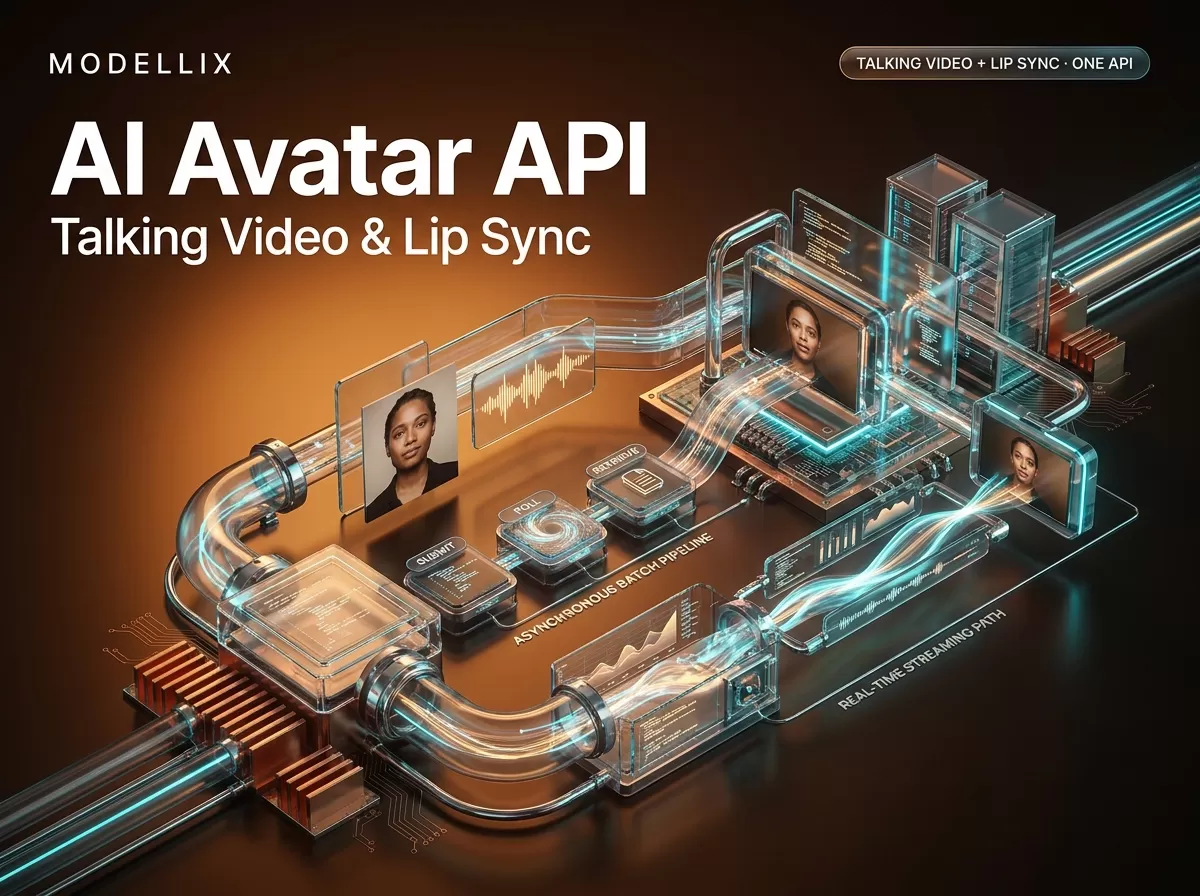
The two delivery architectures for an AI avatar API: asynchronous batch generation (submit → poll → retrieve) and real-time streaming (WebSocket/WebRTC session). Illustrative Modellix artwork for this guide; request shapes follow the vendors' official references.
The distinction is not cosmetic. Batch APIs are the right shape for video pipelines, dubbing jobs, and anything you can queue; Akool's Talking Avatar API documentation describes exactly this queue-then-callback model. Streaming APIs are the right shape for customer-facing conversational agents where a 5-second wait is a dead product. Choosing the wrong one means fighting the wrong latency budget, the wrong billing unit, and the wrong SDK from the first request.
Two capability questions sit on top of the architecture choice. Multilingual coverage varies a lot between vendors (some quote 160+ supported languages, others a few dozen), so if you are localizing into many markets, check the target language is actually in the list before you commit. And stock avatar libraries versus custom avatars is a real sourcing decision: an official library gets you to a working demo in an afternoon (with licensing terms attached), while a custom avatar from your own likeness or a hired actor adds a consent and recording workflow but full control over the face.
AI avatar API pricing in 2026, with units matched
Pricing is where AI avatar API comparisons go wrong, because every page quotes a different unit: credits per second, dollars per second, dollars per minute, or a monthly platform subscription. Read each figure with its unit, accessed August 17, 2026:
| Route | Stated price | Unit |
|---|---|---|
| PixVerse Platform: Lip Sync (external audio) | 4 credits | per second (round up) |
| PixVerse Platform: Lip Sync (TTS) | 4 credits | per 15 bytes of TTS text after UTF-8 encoding |
| PixVerse Platform: Avatar | 5 / 10 / 15 / 20 credits | per second at 360p / 540p / 720p / 1080p |
Modellix pixverse/lipsync |
$0.0400 | per second |
Modellix kling/kling-avatar |
$0.0448 (std) / $0.0896 (pro) | per second |
Modellix vidu/lip-sync |
$0.0200 | per second |
Modellix vidu/viduq2-turbo-digital-human / viduq2-pro-digital-human |
$0.0050 each | per second |
Sources: PixVerse Platform pricing and the Modellix model pages for PixVerse lip sync, Kling Avatar, Vidu lip sync, Vidu Q2 Turbo Digital Human, and Vidu Q2 Pro Digital Human. Modellix rates were checked September 24, 2026; confirm the live badge before budgeting.
The units are different. PixVerse Platform bills in credits, whose dollar value depends on the pack; its pricing page lists 4 credits per second for external-audio lip sync. Modellix bills in dollars per second. A 10-second job on pixverse/lipsync is estimated at $0.40; the equivalent PixVerse Platform task uses 40 credits. Compare the same output spec and purchased credit pack before deciding which route costs less.
Rates can change independently across providers. Re-check the live model page and PixVerse's pricing guide before committing a budget; the guide explains PixVerse's separate credit rules for external audio and TTS.
What about "free" AI avatar APIs? The honest answer: free tiers exist, but they are trial surfaces, not production pricing. LiveAvatar's free plan grants 10 credits, enough to validate lip-sync quality before you pay. D-ID offers a time-boxed trial through its API signup. Consumer apps (HeyGen, Synthesia, Vidnoz) grant free monthly video allowances with watermarks or caps; our AI talking avatar free guide breaks down exactly what each free tier trades. For an API integration you plan to keep, budget for per-second or per-minute rates and treat free credits as a validation line, not a cost model.
How to integrate an AI avatar API: a working walkthrough
Every async AI avatar API in this space follows the same lifecycle: create a task, poll its status, fetch the result when it reaches a terminal state. Here is the shape against Modellix's kling/kling-avatar route, whose documented input is a portrait image plus exactly one audio source: an audio file URL (sound_file) or an audio_id from a TTS API, never both. The snippet follows the model page's documented request shape; it has not been executed against a live account.
import requests, time

API = "https://api.modellix.ai/api/v1"
KEY = "<YOUR_API_KEY>"          # from console → API keys

r = requests.post(
    f"{API}/kling/kling-avatar",
    headers={"Authorization": f"Bearer {KEY}"},
    json={
        "input": {
            "image": "https://your-cdn.example.com/presenter.jpg",
            "sound_file": "https://your-cdn.example.com/voiceover.mp3",
            "prompt": "The presenter speaks naturally to camera with a calm expression",
            "mode": "std",       # std or pro
        }
    },
)
task_id = r.json()["task_id"]

while True:
    status = requests.get(
        f"{API}/tasks/{task_id}",
        headers={"Authorization": f"Bearer {KEY}"},
    ).json()
    if status["status"] in ("succeeded", "failed"):
        break
    time.sleep(5)
print(status["output"]["video_url"])   # or the documented result field

The async task lifecycle every talking-avatar and lip-sync API in this space shares: create a task, poll its status, fetch the result at the terminal state. Illustrative Modellix artwork; the polling interval and terminal-state names follow each vendor's own reference.
Two contract details on this route, from the Kling Avatar documentation: the image is JPG/JPEG/PNG up to 10 MB with a minimum resolution of 300×300, and the audio must be 2 to 300 seconds (mp3/wav/m4a/aac, up to 5 MB). audio_id and sound_file are mutually exclusive; sending both is a documented error. The full submit-poll-retrieve lifecycle, authentication surface, and task-state contract are covered in our PixVerse API guide, which applies to the whole catalog, not just PixVerse.
Choosing the source photo
For photo-to-video, output quality starts with the portrait, because the model has to reconstruct the face before it can animate it. A front-facing, evenly lit head-and-shoulders shot with the face clearly visible beats a high-resolution but cluttered or grainy group photo. Check the route's limits before upload, since they differ by provider: Kling Avatar also requires an aspect ratio between 1:2.5 and 2.5:1, while PixVerse Platform's Image Avatar upload accepts png/webp/jpeg/jpg up to 20 MB within 10000 px. On PixVerse Platform the flow is two steps (upload the portrait to get an img_id, then create the task with either audio_media_id or a TTS speaker plus a 30 to 200 character script). Use your own face or properly licensed portraits for testing; animating someone else's likeness without consent breaks most platforms' terms and is a legal risk.
Consumer photo-avatar apps market two different things under similar words. "No pre-training needed" means the service animates an uploaded photo directly, which is fast but makes quality depend heavily on that one photo. A "digital twin" or custom avatar means a longer setup from several clips or a scripted recording, in exchange for more consistent output, usually on a paid tier. Their free tiers typically mean watermarks, short caps, or a small monthly quota, so find the export limit before planning around one.
The media URLs matter more than developers expect: the provider's servers fetch the image and audio from public URLs. A URL that works in your browser but requires a login, blocks the provider's region, or serves a 403 to non-browser clients will fail the job after you have already been billed for the attempt. Host input media on a public CDN or signed URL with a generous expiry before you submit.
Lip sync APIs: the video-input route
The video lip-sync family is the second most common integration, and it is a different job: you already have footage, and you want the mouth to match new audio. On Modellix's pixverse/lipsync route the documented contract is an existing talking-video URL plus either an audio_url or a speaker_id + tts_content pair (max 140 characters), never both and never neither. PixVerse Platform's official Speech (LipSync) documentation expresses the same choice as audio_media_id vs lip_sync_tts_speaker_id + lip_sync_tts_content, with video up to 60 seconds and TTS scripts up to 200 characters.
# Python skeleton for a pixverse/lipsync-style request (illustrative)
r = requests.post(
    "https://api.modellix.ai/api/v1/pixverse/lipsync",
    headers={"Authorization": "Bearer <YOUR_KEY>"},
    json={
        "input": {
            "video": "https://your-cdn.example.com/speaker_clip.mp4",
            "audio_url": "https://your-cdn.example.com/voiceover.mp3",
            # OR: "speaker_id": "emily", "tts_content": "Hello, this is a test"
        },
    },
)
task_id = r.json()["task_id"]   # then poll GET /api/v1/tasks/{task_id}
The sibling PixVerse lip sync API guide covers its request fields and upload limits. Lip sync retimes lips on existing footage; it does not turn a still image into a presenter. For photo-to-video, use a route such as Kling Avatar, PixVerse Platform Avatar, or D-ID.
Real-time vs async: choosing your architecture
The AI Overview for "ai avatar api" pushes readers toward exactly this decision: real-time streaming (WebRTC, sub-second) versus pre-rendered async (batch, minutes). The ranking pages barely cover it, so here is the working version.
Async batch is what the walkthrough above shows: submit → poll → retrieve. It fits dubbing, localized presenter videos, and ad creative when a short wait is acceptable. Providers with batch APIs include Akool, D-ID, PixVerse, Kling, and Vidu; Azure also documents batch text-to-speech avatar synthesis.
Real-time streaming keeps an open session (typically WebSocket for the control channel and WebRTC for the rendered video frames), and the avatar responds as text or audio arrives. LiveAvatar's realtime API is built for conversational agents (sales, support, teaching), Simli positions the same pattern for agent products, and LiveKit's documentation covers the WebRTC infrastructure layer these services run on. Billing is session-oriented rather than per-output-second, and integration is heavier: you manage connection state, reconnection, and media transport instead of a single POST.
Inside a real-time avatar session
A conversational avatar is a voice pipeline with a video output stage: user speech goes through speech-to-text, turn detection (deciding when the user has finished), an LLM (optionally with a knowledge base for RAG), text-to-speech, and the avatar renderer, with video returned over WebRTC. The real design decision is who runs which stage:
- Vendor-managed full mode. HeyGen LiveAvatar's FULL mode runs the whole pipeline and bills 2 credits per minute; you request an embed (
POST /v2/embeddingsreturns a short-lived URL and script tag) and drop it into a page. - Bring your own stack. HeyGen's Avatar Only (LITE) mode bills 1 credit per minute and leaves STT, LLM, and TTS to you. D-ID's realtime agents support client keys for a backendless embed or a backend session token. LiveKit's avatar plugins give the same split inside an existing agent framework: the avatar worker joins the room as its own participant and publishes synchronized audio and video. Call
wait_for_join()before starting the agent session so the video is live before the agent speaks.
If you already run an LLM and TTS you like, the bring-your-own path avoids paying for stages twice. The metered failure modes are specific to this family:
- Idle sessions still bill. A connected FULL-mode session burns credits during silence just like during speech, so manage session lifecycle explicitly.
- Rounding. D-ID rounds usage up to the nearest 15-second interval; 100 sessions of 8 seconds bill as 100 × 15 seconds.
- Desync is usually pipeline latency. A slow LLM or TTS makes the mouth move late. Instrument per-stage latency, and alert on LiveKit's
AvatarMetricsjoin latency and playback latency, before blaming the renderer. - Region placement. An STT endpoint in a different region from your LLM can quietly double the round trip, so co-locate the stages.
Modellix does not carry a real-time streaming avatar route; for this family go direct to HeyGen, D-ID, or a LiveKit-orchestrated provider.
A useful heuristic: if your product flow is "user clicks generate, waits, gets a video," you want async batch. If your flow is "user talks to an avatar in a live conversation," you want real-time streaming. Hybrid products exist (generate a stock presenter asynchronously, then drive it live for interactive sections), but start with one architecture; the SDK surface and cost model are different enough that building both from day one doubles the integration work.
Status codes and the failure modes that cost money
Asynchronous video generation fails in two financially distinct ways: input-contract errors (your fault, usually caught immediately) and generation-time failures (the provider's side, sometimes refundable, sometimes not). The patterns that waste most integrations' first day:
| Error pattern | Family it hits | Fix |
|---|---|---|
| Both audio paths sent, or neither | Lip sync / photo-to-video | Pick exactly one voice source: audio_url XOR speaker_id + tts_content (or sound_file XOR audio_id on Kling Avatar) |
| Image file too large or wrong format | Photo-to-video | Kling Avatar documents JPG/JPEG/PNG up to 10 MB |
| Audio outside duration limits | Both | Kling Avatar documents 2 to 300 seconds; PixVerse lip-sync up to 60 seconds |
| TTS script over the character cap | Lip sync / photo-to-video | Modellix pixverse/lipsync caps tts_content at 140 chars; PixVerse Platform documents 200 for Speech (LipSync) |
| Source media unreachable from provider servers | Both | The endpoint fetches from public URLs; the URL must resolve for the provider, not just for your browser |
| Reused request trace ID | Both | Generate a unique trace ID per request; reusing one across requests makes stuck jobs harder to diagnose |
Two structural notes. First, refund policies differ and change: PixVerse Platform's FAQ documents automatic credit refunds for generation failure, timeout, and content-moderation rejection, but confirm the current policy before assuming any failed job is billable or refundable. Second, content moderation is a real rejection path: a talking avatar of a public figure or an unauthorized likeness can be rejected at generation time after you have paid for the attempt. Consent is also a cost control. Akool's documentation and Synthesia's avatars page make consent requirements explicit for custom avatars.
When to choose a direct vendor vs an aggregator
Modellix offers one key, one balance, and per-call cost logs across the listed image and video routes. Its Skywork avatar and lip-sync routes were removed on September 24, 2026; their old schemas return 404. If you need SkyReels itself, use the official API. For available alternatives, compare the live Modellix model pages and schemas; a shared key is an integration benefit, not a promise of the lowest unit price.
Choosing direct makes sense when you need capabilities the aggregator does not carry. PixVerse Platform's Image Avatar API (generate a talking video from a still portrait) is a PixVerse Platform capability; Modellix's pixverse/lipsync requires an existing video, and the pixverse/image-avatar model page on Modellix returns "Model Not Found"; it is not carried. Similarly, PixVerse Platform's custom voice-clone uploads, HeyGen's interactive avatar line, D-ID's API, and Tavus's conversational-avatar platform are direct-vendor capabilities; an aggregator gives you the routes it actually lists, not every vendor endpoint. Direct vendors also tend to ship newest model surfaces first, and their enterprise tiers offer the deepest vendor-specific parameters.
Choosing an aggregator makes sense when you want several of these routes behind one integration: one key, one bill, one task lifecycle across providers, and per-task cost visibility. That is a real operational win for multi-model products (the one-API-for-many-video-models integration pattern), but verify the specific model and output spec before assuming any per-unit advantage. Modellix carries image and video models; it does not run its own foundation models, so any comparison that implies an own-LLM or own-model edge is wrong.
How to choose an AI avatar API
Work through the input you can actually produce at scale, then the delivery architecture, then the billing unit:
- You have portraits, not footage → photo-to-video. Check Kling Avatar's image and audio limits; the source-photo checklist in the walkthrough above covers the input side.
- You have recorded talking video and want to re-voice or localize it → video lip-sync. Compare
vidu/lip-syncandpixverse/lipsyncwith the same footage and voice source. PixVerse adds a TTS path. - You need a live conversational avatar → real-time streaming. Evaluate latency, session billing, and connection reliability (LiveAvatar, Simli, LiveKit), not per-second video pricing.
- You want several routes behind one integration → an aggregator makes sense as a workflow choice. It is not automatically cheaper per unit; verify the specific model, resolution, and duration.
- You need vendor-exclusive capabilities (custom voice clones, Image Avatar from photo, enterprise-specific parameters) → go direct for those routes.
Before committing, price a representative task on the exact route (same model, same resolution, same duration, same billing condition), then run a small paid test with your own face and voice. Lip-sync quality is the thing you cannot judge from a spec sheet.
Frequently Asked Questions
What is an AI avatar API?
An AI avatar API turns a voice source into video of a person speaking: it can animate a portrait photo into a talking presenter (photo-to-video), re-sync the lips of an existing video to new audio (video lip-sync), or drive a live conversational avatar in real time (real-time streaming). The three families have different input fields, limits, and billing units.
How much does an AI avatar API cost?
On September 24, 2026, the Modellix routes listed here ranged from $0.0050/second for Vidu's Q2 digital-human routes to $0.0896/second for Kling Avatar Pro. PixVerse Platform bills Lip Sync in credits and Avatar at 5 to 20 credits per second by resolution. Those units are not directly comparable without the purchased credit-pack rate and matching output settings.
Is there a free AI avatar API?
There are free tiers, but they are validation surfaces, not production cost models: LiveAvatar's free plan includes 10 credits, D-ID offers a time-boxed API trial, and consumer apps grant watermarked or capped free allowances. Budget per-second or per-minute rates for anything you plan to run in production.
What is the difference between an AI avatar API and a lip sync API?
Lip sync is one of the three families. An AI avatar API is the general category; photo-to-video APIs create new talking videos from images, while video lip-sync APIs only re-time the mouth of footage you already have. Choosing the wrong one means supplying the wrong input (an image instead of a video, or vice versa).
Can I use an AI avatar API with Python?
Yes. The async lifecycle is a simple submit-then-poll pattern that works with the requests library, as shown in the walkthrough above. The related search "ai avatar api python" reflects exactly this: developers want a code-level path, and the pattern is identical across most providers in this space.
What inputs do I need for a talking avatar API?
A portrait image plus exactly one voice source (photo-to-video), or an existing talking video plus one voice source (lip sync). Kling Avatar documents JPG/JPEG/PNG images up to 10 MB with audio of 2 to 300 seconds; PixVerse lip-sync accepts video up to 60 seconds. Media must be reachable from the provider's servers, not just from your browser.
Does Modellix support PixVerse Image Avatar or voice cloning?
No. Modellix's pixverse/lipsync requires an existing talking video plus audio_url or speaker_id + tts_content; it does not generate a talking video from a photo (that is PixVerse Platform's Image Avatar API) and does not accept arbitrary voice-clone uploads. Kling Avatar covers the photo-to-video family on Modellix.
Build with the latest AI models
Explore image, video and audio models through one API.
Start buildingRelated articles
Talking Avatar API: Integration Guide, Pricing & Code
Talking avatar APIs split into three input families: photo-to-video, video lip-sync, and real-time streaming. Compare current pricing, code, and failure modes.
AI UGC Video Generator: Build It on an API, Not a Seat
An AI UGC video generator is four model calls, not one product. What a 30-second UGC ad costs per component, and where a per-seat tool still wins today.

Kling Motion Control API: Integration Guide, Pricing & Code
How to call the Kling motion control API: version support (2.6 vs 3.0), the real per-second pricing on August 20 2026, and working curl and Python code.
Seedream 4.5 API: Integration Guide, Pricing & Code
Seedream 4.5 API pricing: official BytePlus at $0.04/image, aggregator routes with no activation, model IDs, error handling, and working code.