OpenAI GPT Image 2.5 Is Now on Modellix: Flare, Sunburst, and the Edit Variants Behind One API
If your team generates images at volume, you have lived with a single trade-off: one model, one latency, every task. Draft variants and final marketplace assets queue behind the same endpoint at the same speed. OpenAI just changed that shape. With GPT Image 2.5, released September 8, 2026, the image API splits into two separate model IDs for the first time — Flare for speed and Sunburst for precision — and each now ships in both a generation and an editing variant.
The useful part is not any single headline number. It is that the latency-versus-fidelity trade-off is now a parameter you choose per task instead of a limitation you accept for the whole pipeline — a shift that matters to anyone building a production image pipeline, regardless of which provider they route through.
What actually changed from GPT Image 2
OpenAI describes the 2.5 generation as an improvement across four fronts. The one most teams will feel first is throughput: OpenAI’s API documentation states generation latency up to 50% lower compared with the previous generation, and describes Flare as its fastest model for everyday high-quality generation. On top of that, the models produce more natural lighting and richer textures, and they preserve the subjects in reference photos more reliably. The vendor framing treats these as targets rather than audited benchmarks — so the next section checks them against independent measurement.
That “up to 50%” figure is a vendor comparison, not a guaranteed time per image — and it undersells how much independent measurement now exists. OpenAI notes that complex prompts can take up to two minutes to process, while third-party trackers publish the medians the vendor figure omits:
- Latency, measured independently. Artificial Analysis records a median generation time of roughly 17–20 seconds for Flare at best-provider settings, while third-party test runs put Sunburst at about 1.5–2× Flare on identical prompts (one 20-prompt run measured 24.8s vs. 40.0s). Independent comparisons at a matched output budget measured Flare at 19.7s versus GPT Image 2’s 37.3s — about 47% faster, which broadly confirms OpenAI’s directional claim even though the exact percentage differs by workload.
- Quality, measured independently. The Arena text-to-image leaderboard places GPT Image 2.5 Sunburst at 1,421 Elo and Flare at 1,399, both ahead of GPT Image 2 at 1,381. On the image-edit board, Sunburst leads at 1,520 Elo and Flare at 1,491, again ahead of GPT Image 2’s 1,461. Note these are preliminary scores resting on relatively low vote counts, so treat the ranking as directional rather than settled.
The takeaway is not that the vendor numbers are wrong — it is that the independent numbers give you something a press release cannot: a magnitude you can plan capacity around, and a rough sense of how much Sunburst costs you in wall-clock time versus Flare.
The change that matters most for production, though, is multi-turn editing fidelity. Earlier editing models tended to drift — you asked for a background swap and the product label subtly re-rendered with it. This is not a marketing abstraction: independent research documents the failure mode in detail. A 2026 study of general diffusion-based editing identifies “unintended changes to non-target regions, texture inconsistencies, identity drift, and prompt sensitivity,” and notes these problems are “especially pronounced when edits are applied iteratively.” The GIE-Bench evaluation reports that GPT-Image-1 “frequently introduces unintended changes in areas unrelated to the instruction,” such as altered background textures or shifting lighting — precisely the kind of drift that forces manual review.
GPT Image 2.5 is positioned as better at changing only the elements you asked it to change while leaving the rest of the composition intact. Independent arena data backs the direction of that claim: Sunburst’s +59-point gain over GPT Image 2 on the Arena single-image-edit board is larger than its +40-point gain on text-to-image, suggesting the editing-fidelity improvements are real rather than marketing polish. What the leaderboards do not yet tell you is how the model behaves on your specific asset with your specific mask, so the practical test remains your own before-and-after comparison.
The four model variants
Rather than one model with quality dials, you now route by task. The four variants share the same request shape, so switching lanes is a model-ID change rather than a new integration.
| Model | Task | Best fit |
|---|---|---|
| openai/gpt-image-2.5-flare | Text-to-image | Speed-first generation — high-volume variants, social and campaign drafts, rapid iteration |
| openai/gpt-image-2.5-sunburst | Text-to-image | Quality-first generation — hero shots, product posters, assets that ship |
| openai/gpt-image-2.5-flare-edit | Image-to-image editing | High-throughput edit and retouching pipelines |
| openai/gpt-image-2.5-sunburst-edit | Image-to-image editing | Near-final assets where an edit must not disturb approved composition |
Source: OpenAI API documentation, retrieved September 16, 2026.
Shared generation parameters
Both text-to-image variants take the same five parameters, which keeps prompt logic portable between them:
aspect_ratio— ten options:1:1,3:2,2:3,3:4,4:3,4:5,5:4,9:16,16:9,21:9. Defaults to1:1.resolution—1K,2K, or4K. Defaults to1K. Set independently of aspect ratio.quality—low,medium,high,xhigh,max. Defaults tolow.background—auto,opaque, ortransparent. Transparent requests return PNG.prompt— up to 32,000 Unicode characters.
Aspect ratio and resolution compose, so the pixel output depends on both: 1:1 at 4K returns 2880×2880, while 16:9 at 4K returns 3840×2160. If you need transparent cutouts for compositing — icons, stickers, product overlays — set background to transparent and plan for PNG rather than JPEG.
Two constraints worth writing into your request layer before you commit: the generation models are for creating images, not editing them, and neither exposes arbitrary pixel dimensions. You pick from the aspect-ratio and resolution enums, not from a width/height pair.
Flare vs Sunburst: a routing decision, not a compromise
A common mistake is reading Flare and Sunburst as two tiers of the same thing, where one is simply worse. They are better understood as two lanes for different volumes. The parameters are identical; the difference is what the model spends time on.
The practical pattern is a two-phase pipeline. Route exploration to Flare: if you are generating twenty variants to pick three, the speed lane is where throughput beats marginal fidelity, and the output is disposable by design. Route the winners to Sunburst: once an asset is destined for a landing page, a marketplace listing, or a paid campaign, the extra generation time buys tighter detail and finer control, and you pay it once instead of twenty times.
Defining that rule up front is what turns “GPT Image 2.5 is good” into a cost-predictable workflow. If the routing rule lives only in a team’s head, you end up with developers defaulting to the safer model for everything — and paying the latency tax on every draft.
Editing: 16 reference images and optional masked edits
The edit variants are where the 2.5 generation diverges most from what came before, and they are the part most third-party coverage skips.
Both edit models add an images array of publicly reachable JPEG or PNG URLs. That array is required, and it accepts between 1 and 16 images — a notably high ceiling. In practice, that width lets you feed a product reference, a background reference, a lighting reference, and a brand-style reference in a single request instead of pre-compositing them yourself. For e-commerce and character-consistency work, where the goal is to hold a specific item or person stable across many variants, the upper end of that range is the operationally interesting part.
The optional mask parameter is the sharper tool. It takes a PNG with an alpha channel, and the rule is easy to get backwards: transparent areas indicate the region to edit, and the mask must match the dimensions of the first input image. Everything outside the transparent region is meant to stay as it was. This is what turns a broad “retouch this asset” request into a precise one — swap one object, update a layout element, or remove a defect while leaving the approved composition untouched.
Omit the mask and the model decides what to change based on the prompt alone. That is fine for style passes; it is riskier when a stakeholder has already signed off on everything except one corner.
Speed vs quality in editing
The edit variants follow the same logic as generation. Use Flare Edit when you are plumbing out variations or correcting defects across a large source set — cost per edit and turnaround dominate. Use Sunburst Edit when a specific product, person, or brand mark must survive the change intact and the asset is close to final. One caveat applies to both: exact input-fidelity control is not exposed as a parameter, so if pixel-perfect preservation of a region is a hard requirement, verify it against your own asset rather than assuming it.
How to put it into practice
Whichever provider you route through, the integration path is short because the four variants share one request shape.
- Pick your lane. Start with the Flare model ID for generation or a Sunburst edit variant for precision edits, and check the model documentation for the exact parameter set.
- Test one real prompt before writing integration code. Run a prompt at your actual target size —
4:3at4K, say, or16:9at2K— and confirm the output dimensions and, for text-heavy creative, the text fidelity. - Wire it in. Every variant uses the same asynchronous pattern: POST your request, receive a
task_idand a poll URL in the response, then retrieve the finished image from that URL. Because the request shape is shared, moving a workload from Flare to Sunburst is a one-line model-ID change. - Lock the routing rule. Write the Flare-for-drafts, Sunburst-for-finals decision into your task configuration so it is enforced by code rather than convention.
Note: before you commit a resolution or a unit cost to a spec sheet, run one paid test image at your real target size and confirm the output against your own requirements. A
4K1:1output is 2880×2880, not 4096×4096 — small assumptions like that are cheapest to catch early.
We ran all four models on the same prompt
Everything above is what the vendor and the public leaderboards report. To check those claims against the API itself, the Modellix team ran the four models on one controlled task: an e-commerce packshot of a frosted glass skincare bottle with a brushed metal cap, seamless light grey background, soft studio light from the left, condensation droplets, sharp focus on the metal texture. Every generation used the same parameters — aspect_ratio 1:1, resolution 4K, and the quality setting noted per figure. Latency and price are read straight from the API response fields (duration in milliseconds and billing.amount in USD), not timed locally; settings marked * are the median of three independent runs, and everything else is a single run.
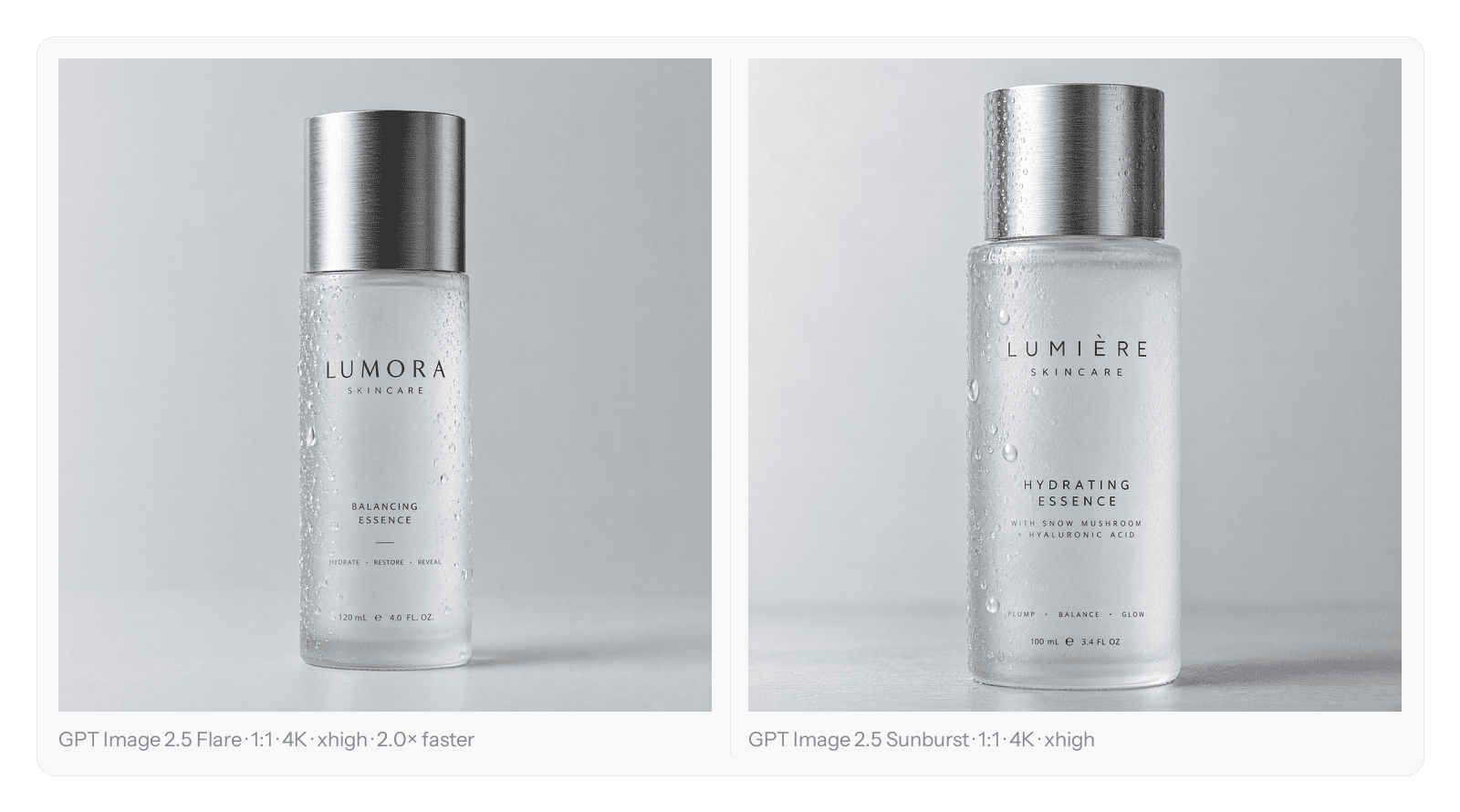
Flare (left) and Sunburst (right), same prompt and same 1:1 · 4K · xhigh settings. Flare returned in 62.3s, Sunburst in 124.0s — the same output, roughly twice the wait.
On that run, the vendor’s pricing model held up and the latency gap was real:
| Run (same prompt, 1:1 · 4K) | Settings | Latency | Price |
|---|---|---|---|
| Flare | xhigh * | 62.3s | $0.2846 |
| Sunburst | xhigh * | 124.0s | $0.2847 |
| Flare Edit | xhigh | 83.9s | $0.316 |
| Sunburst Edit | xhigh | 139.7s | $0.316 |
* median of three runs. Edit runs are single runs.
Source: Modellix team first-party benchmarks via the Modellix API, September 16, 2026.
Two things stand out. First, at a matched quality setting, price is effectively identical between the speed and quality variants — Sunburst’s premium is time, not money, which is exactly what the routing decision above assumes. Second, the ratio is close to 2.0× for generation and about 1.67× for editing on this task. Your own ratio will move with prompt complexity and load, but the direction is consistent enough to plan around.
The quality dial moves further than the model name does
The more useful finding came from sweeping the quality parameter on a single model. The gap between Flare and Sunburst at the top setting is modest; the gap between low and xhigh on the same model is enormous.
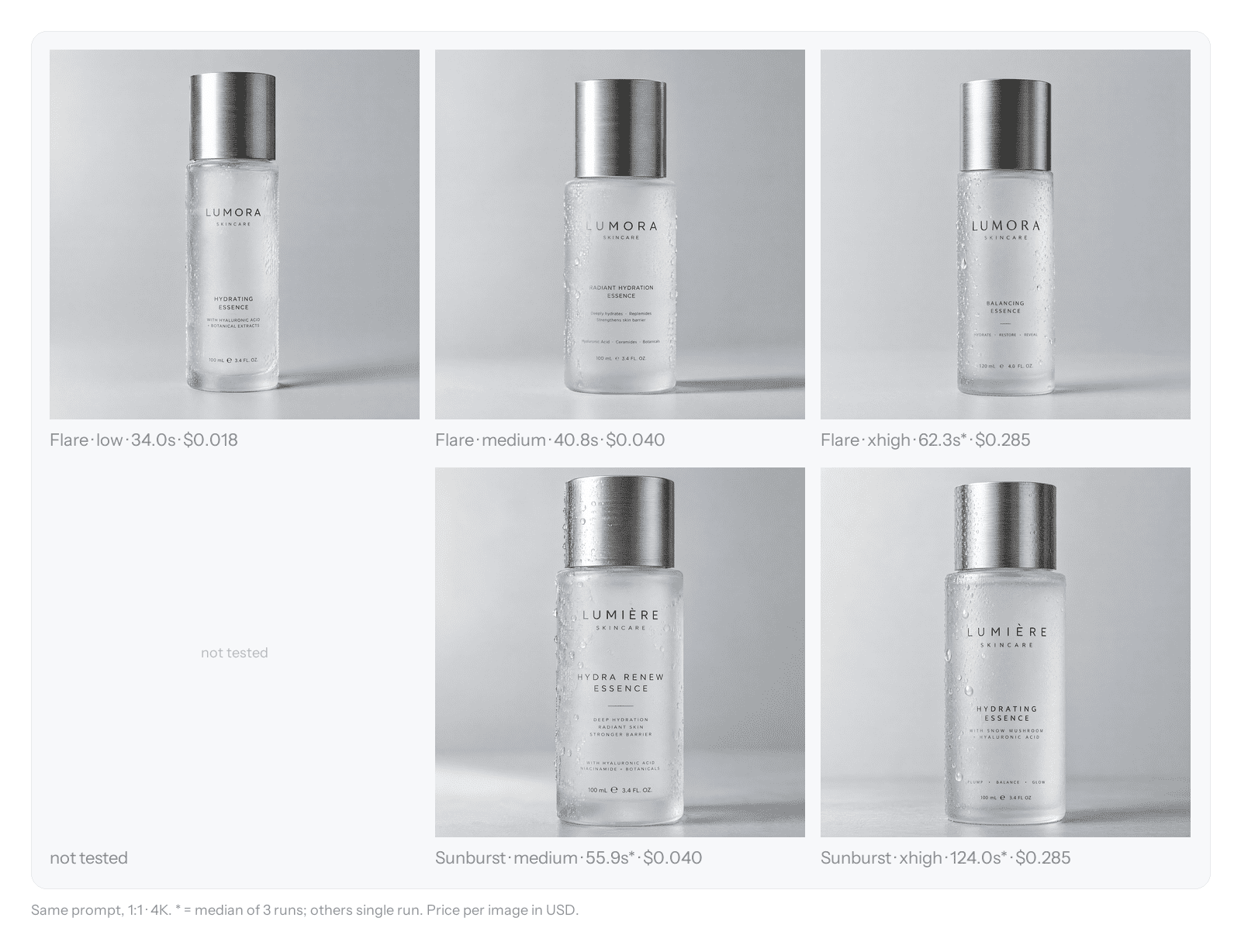
Same prompt, 1:1 · 4K, across quality settings. Flare spans $0.018 to $0.285 on one model and one prompt — a 16× spread.
| Model | quality | Latency | Price |
|---|---|---|---|
| Flare | low | 34.0s | $0.018 |
| Flare | medium | 40.8s | $0.040 |
| Flare | xhigh * | 62.3s | $0.285 |
| Sunburst | medium * | 55.9s | $0.040 |
| Sunburst | xhigh * | 124.0s | $0.285 |
* median of three runs. Sunburst at low was not tested.
Source: Modellix team first-party benchmarks via the Modellix API, September 16, 2026.
The practical takeaway is that switching from Flare · xhigh to Sunburst · medium cut latency (62.3s to 55.9s) and cost roughly 7× ($0.285 to $0.040) — and by eye the two were hard to tell apart. Flare at low was the one setting we could clearly mark down: it lost material detail on the metal cap and droplets. So if your budget conversation stops at “which model,” you are optimising the smaller of the two levers. Pick the quality setting first, then the model.
What the magnified crops actually show
At thumbnail size the Flare and Sunburst frames look nearly interchangeable. The difference only appears under magnification.
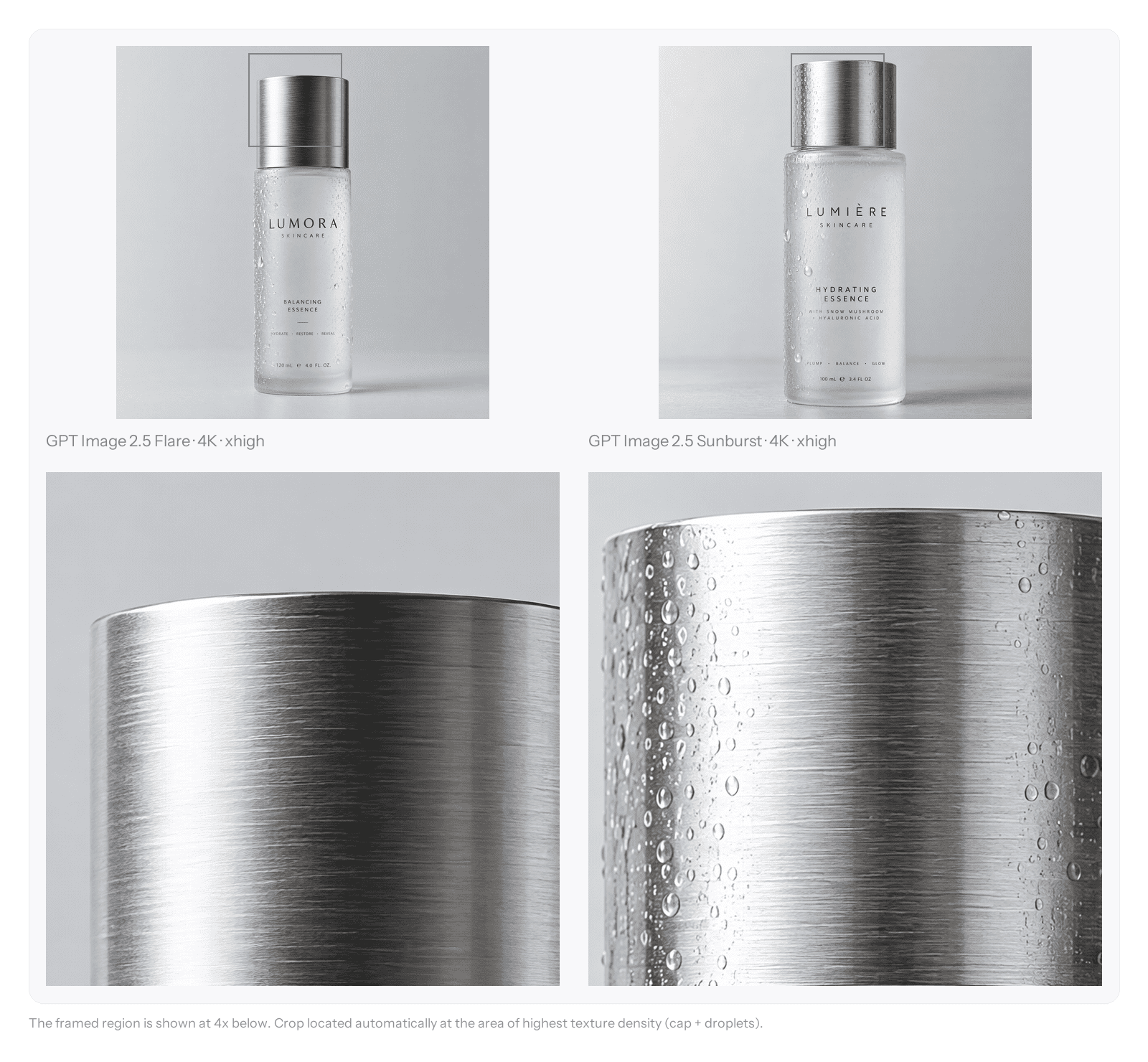
The framed region (cap plus droplets) shown 4× below each full frame.
At 100% and 4× zoom, Sunburst resolved the droplets with more structure while Flare’s metal read slightly softer — a judgement made by eye, so treat it as an opinion, not a measurement. The honest conclusion on this task is that the quality premium is real but small, and only matters when the asset will be viewed close enough for it to show.
Editing behaves the same way
The edit variants followed the same pattern under a real instruction: replace the seamless background with a warm walnut wood surface lit by soft window light, and add a subtle contact shadow — while keeping the bottle, its brushed metal cap, and the label completely unchanged.
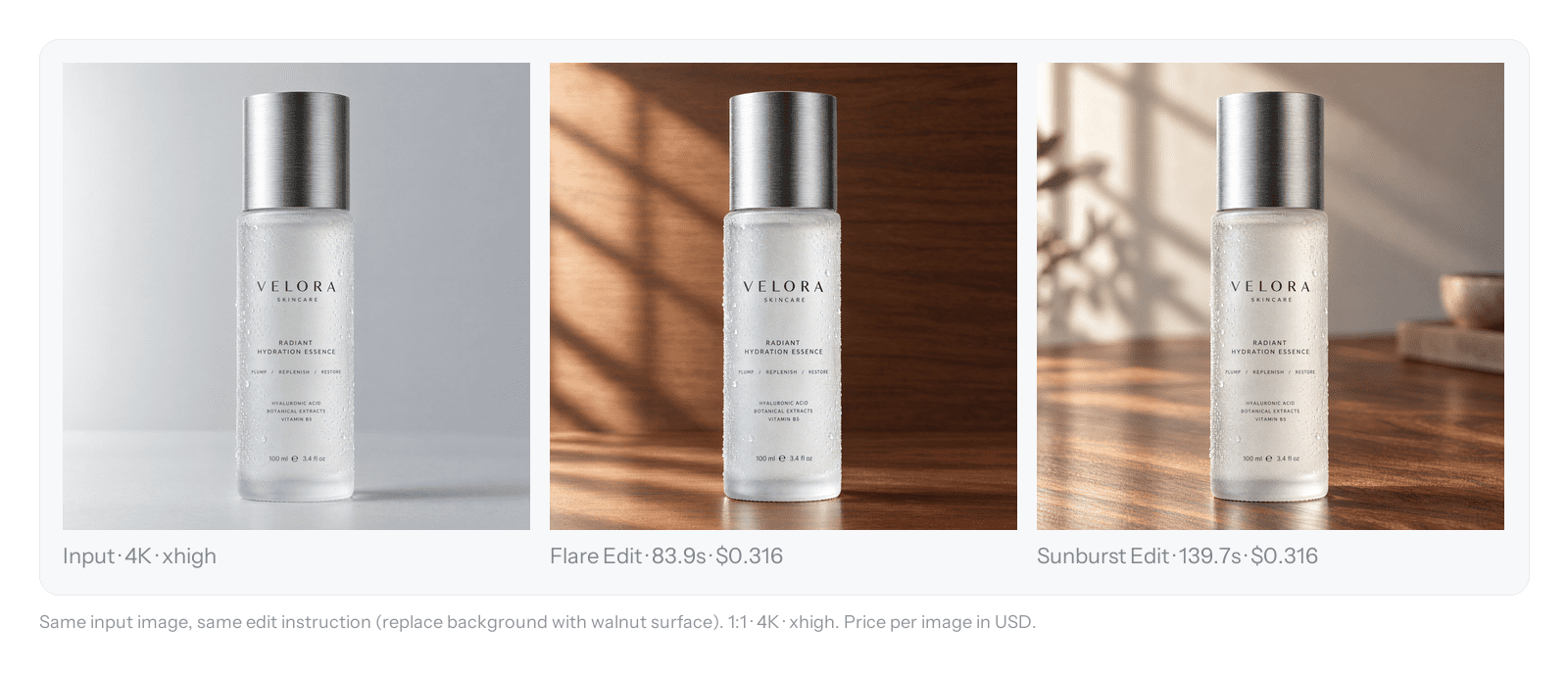
Input (left), Flare Edit (middle), Sunburst Edit (right) — same input, same instruction. Flare Edit 83.9s, Sunburst Edit 139.7s, both $0.316.
Both models kept the product and its label intact and diverged mainly on the new background edge — the closest thing to a controlled test of the editing-fidelity claim that we could run on one asset. It is one asset and one instruction, so it is directional rather than conclusive, but it lines up with the leaderboard signal: the edit task is where the quality-oriented variant earns its extra time.
What to evaluate first
GPT Image 2.5 is worth evaluating mainly because it makes your image pipeline explicit: which tasks tolerate latency, which ones need precision, and where a mask should constrain the model’s freedom. That clarity is the real deliverable — the quality improvements are the reason to test it.
The caveat is that the leaderboard and vendor claims are still the weaker half of the evidence, and our own runs cover one prompt, one asset, and one edit instruction — enough to confirm the shape of the trade-off and the direction of the pricing, not enough to predict your exact numbers. What the first-party test does give you is a concrete starting point: latency roughly doubles from Flare to Sunburst at matched settings, price at matched settings is effectively flat, and the quality dial is the bigger lever of the two. From there, the most useful next step is a small, controlled test on your own assets: generate a handful of drafts on the speed lane, run one precision edit on a signed-off composition, and measure both against the workflow you use today. The numbers you gather yourself will be more useful to a procurement decision than any leaderboard Elo, because they reflect your prompts, your reference images, and your quality settings.
How this article was sourced: the performance and parameter claims here are drawn from OpenAI’s official API documentation and from independent third-party benchmarks (Artificial Analysis, the Arena/LMArena image leaderboards, and published evaluation research such as GIE-Bench). The measurements in “We ran all four models on the same prompt” are first-party: the Modellix team ran all four models on the Modellix API on a single controlled prompt, reading latency and price directly from the API response fields (duration in milliseconds and billing.amount in USD) rather than timing locally. Settings marked * are the median of three independent runs; all others are a single run. Visual comparisons were made by eye at 100% and 4× zoom and are labelled as opinions, not metrics. This test covers one prompt, one asset, and one edit instruction, so it is directional rather than exhaustive. On transparency: this article was written by the Modellix team, and Modellix is the API platform used for the tests. We carry the OpenAI image models alongside models from other providers, so we have a commercial interest in readers adopting a multi-model API — which is one reason the test method, the response fields used, and the run counts are stated in full above. The product subject is a generated test image, not a real brand. Vendor-stated figures are labelled as such throughout, and leaderboard scores are current as of mid-September 2026 with preliminary vote counts, so they may shift. Published September 16, 2026.